

ChatGPTables
A Chrome extension that transforms ChatGPT HTML tables into markdown format for seamless use.
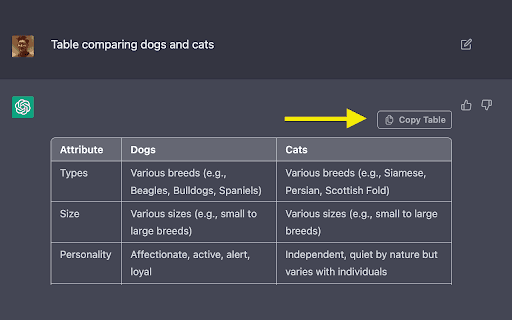
About ChatGPTables
ChatGPTable is a powerful Chrome extension that simplifies converting HTML tables from ChatGPT responses into markdown syntax and image formats. Easily copy tables from ChatGPT and paste them into your documents, reports, or platforms with minimal effort.
How to Use
Click the "Table copy" button to convert the HTML table from a ChatGPT response into markdown format. Then, paste the markdown table into your desired application or document.
Features
- Includes a "Table copy" button for quick conversion
- Transforms ChatGPT HTML tables into markdown syntax and images
Use Cases
- Convert ChatGPT-generated tables into markdown for documentation and reports
Best For
Content creatorsDevelopersWritersData analystsResearchers
Pros
- User-friendly with a simple "Table copy" button
- Streamlines converting HTML tables to markdown automatically
- Facilitates integrating ChatGPT tables into various platforms
Cons
- Only supports HTML tables from ChatGPT responses
- Dependent on the accuracy of ChatGPT's table output
FAQs
What is ChatGPTable?
ChatGPTable is a Chrome extension that converts ChatGPT HTML tables into markdown format for easy copying and use.
How do I use ChatGPTable?
Click the "Table copy" button on the ChatGPT response, then paste the markdown table into your document or platform.
Can I convert images of tables with this extension?
No, ChatGPTable only converts HTML tables from ChatGPT responses, not images of tables.
Is ChatGPTable compatible with all browsers?
It is designed as a Chrome extension, ensuring optimal compatibility with the Chrome browser.
Does ChatGPTable support multiple formats?
Yes, it converts HTML tables into both markdown syntax and image formats for versatile use.