

ChatGPTalk Sidebar
Seamlessly integrate ChatGPT into your browser sidebar for effortless text capture and AI-driven interactions. Enhance productivity by summarizing content, engaging with videos, and managing web content efficiently.
About ChatGPTalk Sidebar
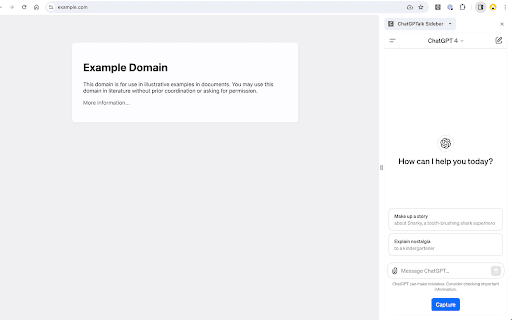
The ChatGPTalk Sidebar extension transforms your browsing experience by integrating ChatGPT directly into a user-friendly sidebar. It enables quick text extraction from web pages and YouTube subtitles, automatically inserting the content into ChatGPT for summaries, questions, or other interactions. The extension offers customizable prompt templates and intelligent text segmentation to handle lengthy documents seamlessly, boosting your efficiency while browsing or researching online.
How to Use
Install the ChatGPTalk Sidebar extension in your browser. Navigate to a webpage or YouTube video. Click the 'Capture' button within the sidebar to extract the text or subtitles. The captured content is automatically inserted into ChatGPT with a preset prompt. Proceed to interact with ChatGPT for summaries, questions, or tasks.
Features
- YouTube subtitle transcription
- Customizable prompt templates
- Direct ChatGPT integration
- Quick text capture from web pages
- Smart text segmentation for large documents
Use Cases
- Quickly summarizing online articles
- Engaging with YouTube videos through transcriptions
- Efficient web research without switching tabs
- Creating content drafts from web content
- Extracting and analyzing lengthy documents
Best For
Pros
- Streamlines access to ChatGPT within your browser
- Effectively manages large texts with smart segmentation
- Automatically inserts prompts for efficient summarization
- Quickly captures text from web pages and videos
Cons
- Text quality impacts AI response accuracy
- Dependent on ChatGPT's availability and performance
- Requires installation of a browser extension