

ChatGPT助手
A powerful browser extension that leverages AI for efficient problem-solving and assistance.
About ChatGPT助手
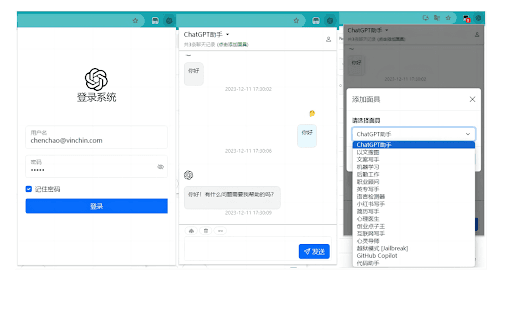
This browser extension adds a convenient button to your toolbar. When facing a problem, click the icon, type your question or content, and receive solutions tailored to your context. Features include integrated login, multiple preset scenarios, and the latest OpenAI AI technology. Chat history is securely stored locally for privacy.
How to Use
Install the extension, log in securely, click the toolbar icon, select a scenario, and input your question or content in the chat window.
Features
- Leverages the latest OpenAI AI models
- Provides AI-driven problem-solving assistance
- Includes multiple preset scenarios for different needs
- Stores chat history locally for privacy
- Secure login for user authentication
Use Cases
- Troubleshooting technical problems
- Learning complex concepts
- Brainstorming and idea generation
- Getting expert advice on various topics
Best For
Individuals seeking quick solutionsResearchers and academicsDevelopers and programmersStudents and learners
Pros
- Utilizes advanced OpenAI models for accurate responses
- Ensures privacy with local chat history storage
- Easy access to AI assistance directly from your browser
- Supports multiple scenarios for diverse needs
Cons
- Upcoming features like image and voice support are not yet available
- Requires user login for full functionality
FAQs
Does the extension upload my chat history online?
No, all chat history is stored locally on your device, ensuring privacy.
Which AI models does the extension utilize?
It uses OpenAI's latest models to deliver accurate and relevant responses.
Are there plans to add new features?
Yes, future updates will include support for images and voice interactions.
Is the extension free to use?
The extension is free; additional premium features may be available later.
How secure is my data when using this extension?
Your chat data remains stored locally, ensuring your privacy and security.