

chatlyn AI
Chrome extension powered by Chatlyn AI that generates answers from selected website text for quick reference and support.
About chatlyn AI
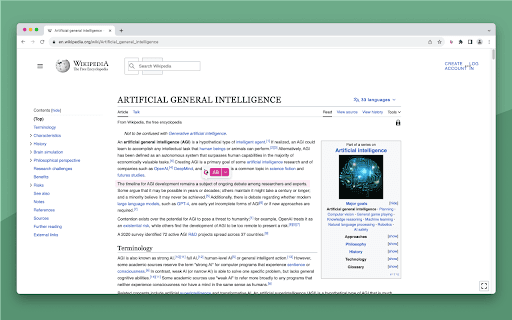
The Chatlyn AI Chrome extension enhances your browsing experience by enabling instant answer generation from selected webpage text. Easily copy responses generated by multiple Chatlyn AI assistants, streamlining support, research, and content creation tasks.
How to Use
Install the Chrome extension, highlight text on any webpage, and click the extension icon to generate an answer. The response is automatically copied to your clipboard for easy use.
Features
- Supports multiple Chatlyn AI assistants for diverse tasks
- Generates answers from highlighted webpage text
- Automatically copies responses to the clipboard
Use Cases
- Summarizing customer inquiries
- Creating quick review responses
- Assisting support agents with instant information
- Enhancing content creation workflows
Best For
Customer support teamsReview moderatorsContent creatorsHelp desk staffResearch analysts
Pros
- Integrates seamlessly with web browsing activities
- Supports multiple AI assistants for varied needs
- Eliminates switching between applications
- Speeds up response generation
Cons
- Requires an active Chatlyn AI account
- Performance depends on Chatlyn AI model quality
- Limited to text-based answer generation
FAQs
What does the Chatlyn AI Chrome extension do?
It allows users to select text on websites and generate instant answers using Chatlyn AI, which are automatically copied to the clipboard.
Is a Chatlyn AI account necessary to use the extension?
Yes, a Chatlyn AI account is required to access the extension's answer generation features.
Can I use the extension on any website?
Yes, the extension works with any website where you can select text.
How do I generate answers with the extension?
Highlight the desired text on a webpage, click the extension icon, and the AI will produce a response that is copied to your clipboard.
Is the extension easy to install?
Yes, simply add it from the Chrome Web Store and follow the setup instructions.