

ChatSonic Chrome Extension
AI-powered Chrome extension designed for efficient content creation and seamless communication with real-time information updates.
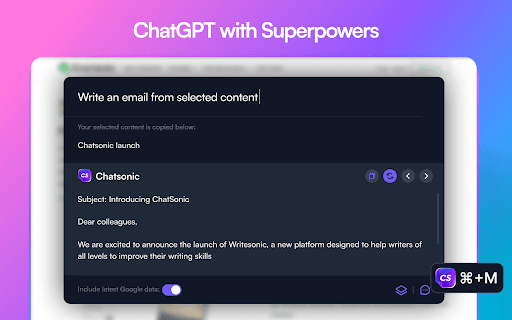
About ChatSonic Chrome Extension
ChatSonic is a versatile Chrome extension that streamlines content creation and communication tasks. Powered by AI similar to ChatGPT, it helps users generate, summarize, and respond to emails, social media posts, and more. Its integration with Google Search ensures access to the latest information, setting it apart from ChatGPT's static data limited to 2021.
How to Use
Install the ChatSonic Chrome extension and access its features within Gmail, Twitter, LinkedIn, Google Docs, and other websites. Use right-click menus or the CMD+M shortcut to generate content, summarize text, or respond quickly.
Features
- Generate and summarize emails efficiently
- Enhance customer support with AI responses
- Create engaging social media posts for Twitter and LinkedIn
- Integrate with Google Search for the latest updates
- Quickly check word and character counts
- Summarize web pages and provide contextual replies
Use Cases
- Crafting email responses in Gmail
- Summarizing lengthy articles for quick understanding
- Personalizing customer support replies
- Creating impactful social media content
Best For
Marketing professionalsContent creatorsCustomer support teamsEmail marketersResearchersSocial media managers
Pros
- Provides real-time updates with Google Search integration
- Compatible with Gmail, Twitter, LinkedIn, and more
- Speeds up content creation and communication workflows
- Includes features like email summarization and social media post generation
Cons
- May exceed Google Ads character limits
- Czech translation feature may occasionally malfunction
- AI-generated content might require review for accuracy
FAQs
Which platforms are compatible with ChatSonic?
ChatSonic works seamlessly with Google Docs, Gmail, LinkedIn, Twitter, Facebook, and other supported platforms.
How can I access ChatSonic's functionalities?
Use right-click context menus, the CMD+M shortcut, or interact directly within supported websites like Gmail and Twitter.
How does ChatSonic provide current information?
ChatSonic integrates with Google Search to deliver the latest, accurate information, unlike ChatGPT which is limited to data up to 2021.
Is ChatSonic suitable for social media managers?
Yes, it helps create engaging posts and manage communication efficiently across platforms.
Can ChatSonic assist with customer support?
Absolutely, it can generate personalized responses and improve support team productivity.