

Chatterclock — Track Your GPT-4 Messages
Monitor your GPT-4 message usage and remaining quota within ChatGPT seamlessly.
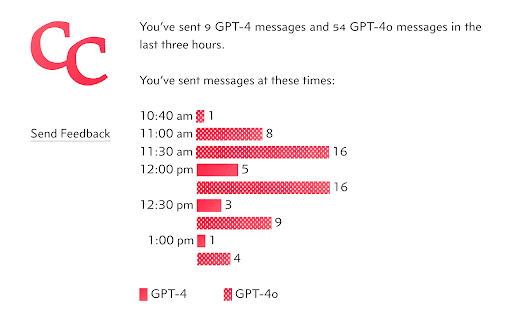
About Chatterclock — Track Your GPT-4 Messages
This browser extension provides real-time tracking of your GPT-4 message consumption within your OpenAI account. It displays usage details as a badge on the extension icon and updates automatically with any changes to your message limits. For team workspaces, it tracks message counts separately for each team, ensuring accurate monitoring across multiple accounts.
How to Use
Install the browser extension, which automatically monitors your GPT-4 message consumption. It shows the current usage count and notifies you when your message limit resets. No manual setup required.
Features
- Tracks message usage separately for team workspaces
- Automatically updates with changes to your OpenAI message limits
- Displays countdown until message limit resets
- Monitors GPT-4 message consumption in real-time
- Shows remaining message quota clearly
Use Cases
- Managing message usage across personal and team ChatGPT accounts
- Avoiding message limit overages with real-time monitoring
- Planning GPT-4 usage based on remaining messages and reset timings
Best For
ChatGPT users seeking usage insightsTeam members managing shared GPT-4 quotasOpenAI account holdersGPT-4 subscribers
Pros
- Helps prevent exceeding GPT-4 message limits
- Automatically syncs with OpenAI's changing quotas
- Supports both individual and team account tracking
- Provides clear, at-a-glance usage visibility
Cons
- Limited to message count tracking only
- Requires browser extension installation
- Dependent on accurate OpenAI message usage data
FAQs
What is the main purpose of this extension?
It tracks your GPT-4 message usage and displays remaining quota and reset times within ChatGPT.
Can it monitor multiple team workspaces?
Yes, it tracks message counts separately for each team workspace you belong to.
Is the extension's tracking automatic?
Yes, it automatically updates your message usage and adjusts to OpenAI quota changes.
Does this extension work for personal and team accounts?
Absolutely, it supports usage tracking for both individual and team ChatGPT accounts.
How does it notify me about message limits?
It displays the remaining messages and notifies you when your message limit is about to reset.