

Chatty File Uploader
A powerful extension for uploading and processing files directly within ChatGPT, enhancing your workflow.
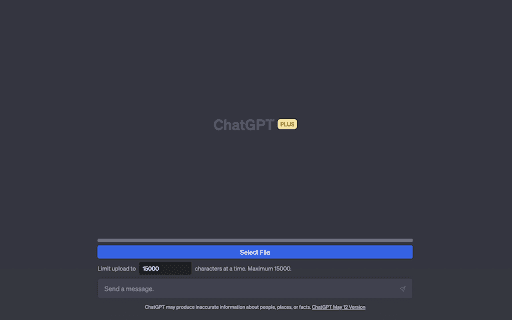
About Chatty File Uploader
This extension improves your ChatGPT experience by enabling seamless upload and processing of text files. It intelligently splits large files into smaller sections to prevent overload, allowing users to summarize content, analyze data, debug code, and perform various text processing tasks efficiently.
How to Use
Install the extension, click 'Submit File' to upload your document, and enter your prompt beforehand for optimal results. Use the 'Character Count' setting to manage chunk sizes and prevent errors. The extension automatically splits large files into manageable sections.
Features
- Seamless file upload and processing within ChatGPT
- Customizable character count to optimize performance
- Progress indicator for upload status
- Automatic segmentation of large files into smaller chunks
Use Cases
- Debugging and reviewing code
- Summarizing lengthy reports
- Extracting action points from meetings
- Identifying patterns in tabular data
- Analyzing interview transcripts
Best For
Data analystsStudentsProject managersSoftware developersContent writersResearchers
Pros
- Supports various file formats including .txt, .csv, .json
- User-friendly interface for easy operation
- Facilitates quick document analysis and summaries
- Enables processing of large text files within ChatGPT
Cons
- May require adjusting 'Character Count' for optimal results
- Limited to specific file formats
- Functionality restricted to chat.openai.com platform
FAQs
Which file formats does this extension support?
It supports common formats such as .txt, .md, .js, .py, .html, .css, .json, and .csv files.
How do I use this extension?
Install it, click 'Submit File' to upload your document, and enter your prompt before uploading. Adjust 'Character Count' to avoid errors.
Why is setting the 'Character Count' important?
Lowering the 'Character Count' helps prevent overloads by splitting large files into smaller chunks, ensuring smooth processing.
Can I process large files within ChatGPT?
Yes, the extension automatically segments large files into smaller parts for efficient analysis and summarization.
Is the extension compatible with all browsers?
It is designed specifically for chat.openai.com and works best on supported browsers like Chrome and Firefox.