

ChatYY
A versatile AI assistant designed to deliver instant answers, facilitate content creation, and enhance web browsing experiences seamlessly.
About ChatYY
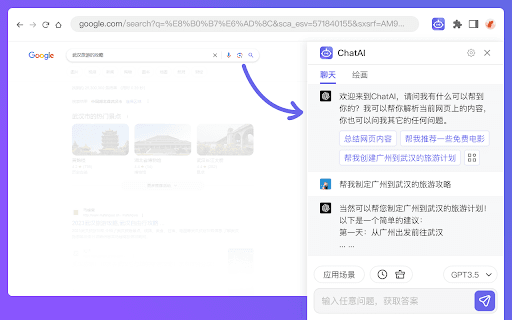
ChatYY AI Assistant is a multifunctional tool that elevates your online activities. It provides instant answers, high-quality article writing, AI-driven image creation, and quick YouTube video summaries. Designed to upgrade search experiences, it makes browsing faster and more efficient, offering a smarter way to explore the web.
How to Use
Press Cmd+M or Ctrl+M to activate ChatYY. Highlight unfamiliar words on a webpage for instant translation or explanation. Use preset topics to start engaging conversations. Click to quickly summarize YouTube videos.
Features
- Instant translation and explanation of words
- AI-generated images from text prompts
- No account login required
- AI-enhanced answers in Google and Bing search results
- Content creation for blogs and advertisements
- Mobile compatibility for Android and iOS devices
- Chat interface for quick, AI-powered responses
- PDF document interaction
- Web browsing directly within the plugin
- Predefined conversation topics
- One-click YouTube video summaries
Use Cases
- Creating engaging blog posts and ad copy
- Quickly summarizing YouTube videos
- Interacting with and annotating PDFs
- Generating AI images from textual descriptions
- Getting instant answers while browsing
Best For
Students seeking quick infoOnline researchersContent marketersDigital content creatorsAnyone needing rapid online assistance
Pros
- All-in-one AI assistant with diverse functionalities
- Supports AI image generation
- Improves search results with AI-powered answers
- Supports mobile use for on-the-go productivity
- No account registration needed
- Facilitates content creation and summarization
- Simple activation with shortcut commands
Cons
- Depends on external platforms like Google and YouTube
- Performance varies with AI model quality
- AI image generation may be limited compared to specialized tools
FAQs
How can I activate ChatYY?
Activate ChatYY by pressing Cmd+M or Ctrl+M on your keyboard.
What features does ChatYY offer?
It provides instant answers, content creation, YouTube video summaries, AI image generation, PDF interaction, and more.
Is an account required to use ChatYY?
No, you can access all features without creating an account.
Can I use ChatYY on mobile devices?
Yes, ChatYY supports both Android and iOS for mobile use.
How does ChatYY improve my web browsing experience?
It offers instant answers, AI-generated content, and quick summaries, making browsing more efficient and engaging.