

ClaudeBuff - Enhanced UI for ClaudeAI
Chrome extension that enhances the ClaudeAI user interface with customizable appearance options and streamlined conversation navigation.
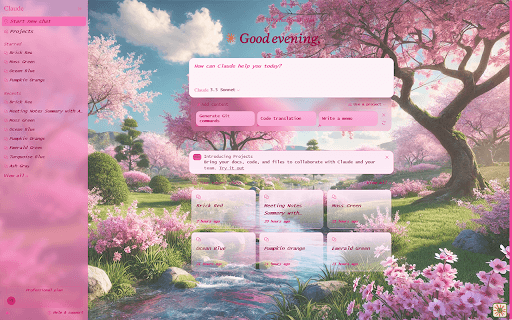
About ClaudeBuff - Enhanced UI for ClaudeAI
ClaudeBuff is a powerful Chrome extension designed to personalize and improve the ClaudeAI chat interface. It offers extensive customization options, including theme color adjustments, background image uploads with transparency control, and text styling features like font selection and sizing. Additionally, it provides keyboard shortcuts for quick chat navigation and prompt reuse, boosting your efficiency and making your AI interactions more comfortable and visually appealing.
How to Use
Install the ClaudeBuff Chrome extension from the browser. Access the settings menu to customize themes, background images, and text styles. Use designated keyboard shortcuts to navigate chats and reuse prompts effortlessly for a smoother experience.
Features
- Customizable background images with opacity control
- Advanced text styling options including font and size
- Personalizable theme color settings
- Keyboard shortcuts for quick chat navigation
- Hotkeys for prompt reuse
Use Cases
- Navigate chats faster with hotkeys and shortcuts
- Personalize the interface to suit your preferences
- Improve readability and reduce eye strain during long sessions
Best For
Pros
- Enhances navigation speed and workflow efficiency
- Simple installation and easy to use
- Offers extensive visual and functional customization
- Improves overall user experience with visual enhancements
Cons
- Relies on ClaudeAI's interface updates
- Requires some familiarization with shortcuts
- Limited to use within the Chrome browser