

ClaudeSave
Quickly save Anthropic Claude messages to GitHub Gists with a single click for easy backup and sharing.
About ClaudeSave
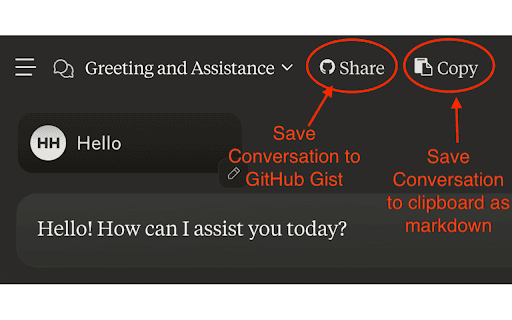
This tool enables users to instantly save their Anthropic Claude chat history to GitHub Gists with a single click. It simplifies backing up, sharing, and organizing conversations, making it easier to access critical information later.
How to Use
Install the browser extension or use the provided script. Once installed, a save button appears within the Anthropic Claude interface. Click it to automatically store the current conversation as a GitHub Gist.
Features
- One-click export of Claude chat transcripts to GitHub Gists
Use Cases
- Sharing Claude conversations with colleagues or friends
- Archiving chat history for future reference
- Backing up important Claude interactions
- Creating a searchable repository of chat logs
Best For
ResearchersFrequent Anthropic Claude usersWritersCustomer support teamsDevelopers
Pros
- User-friendly and easy to operate
- Simplifies chat backup process
- Stores conversations centrally for easy access
- Enhances collaboration and sharing
Cons
- Gists are public by default; private conversations require secret Gists
- Requires permission to access Claude chat data
- Dependent on the ongoing support of Anthropic Claude and GitHub Gists
- Requires a GitHub account for use
FAQs
Do I need a GitHub account to use this tool?
Yes, a GitHub account is necessary to save conversations as Gists.
Are my saved conversations private?
By default, Gists are public. You can choose to save them as secret Gists for privacy.
Is this tool officially supported by Anthropic or GitHub?
This is a third-party tool and is not officially supported by Anthropic or GitHub. Use it at your own discretion.
Can I save multiple conversations at once?
The tool saves each conversation individually as a separate Gist, making it easy to organize multiple chats.
Does this tool work with all browsers?
It works with most modern browsers that support extensions or scripts, such as Chrome and Firefox.