

Comment Booster for LinkedIn
An AI-powered LinkedIn extension designed to generate relevant comments that enhance engagement and visibility.
About Comment Booster for LinkedIn
Comment Booster for LinkedIn is a cutting-edge tool that helps you increase your visibility and engagement on LinkedIn efficiently. Powered by AI and GPT technology, it creates relevant, well-crafted comments to facilitate active participation in posts and conversations.
How to Use
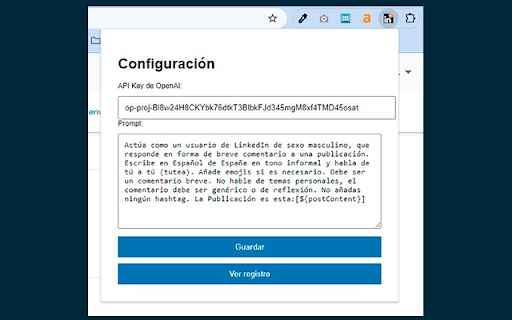
Install the extension, input your OpenAI API key, customize the comment prompt to suit your style, and use it to generate quick, effective responses on LinkedIn posts.
Features
- AI-driven comment generation with GPT technology
- Automates the creation of comments
- Allows customization of comment prompts
Use Cases
- Engaging actively on LinkedIn posts to increase profile visibility
- Driving more interactions through automated comments
- Supporting content creators and marketers in building engagement
- Enhancing outreach efforts for sales and networking
- Saving time on comment drafting
Best For
Content creatorsMarketing professionalsBusiness development managersJob seekersInfluencersSales teams
Pros
- Enhances your Social Selling Index (SSI)
- Saves time by automating comment creation
- Boosts visibility and engagement on LinkedIn
- User-friendly interface
- Generates personalized, high-quality comments
Cons
- Risk of generic or off-topic comments if not properly customized
- Comment quality depends on prompt effectiveness
- Requires an OpenAI API key for operation
FAQs
How does Comment Booster improve my LinkedIn visibility?
By actively commenting on posts, you increase your presence and reach within your network and beyond.
In what way does this extension help enhance my Social Selling Index?
Regular, meaningful engagement through comments boosts your SSI, reflecting your activity and influence on LinkedIn.
Can I personalize the comments generated by this tool?
Yes, you can customize the GPT prompt to ensure comments align with your style and goals.
Is it easy to set up and use?
Yes, installation is straightforward, and the interface is designed to be intuitive for all users.
Does this tool require any special technical setup?
You need to input your OpenAI API key, but no advanced technical knowledge is necessary.