

ContextAI
Chrome extension that provides context-aware AI reply capabilities.
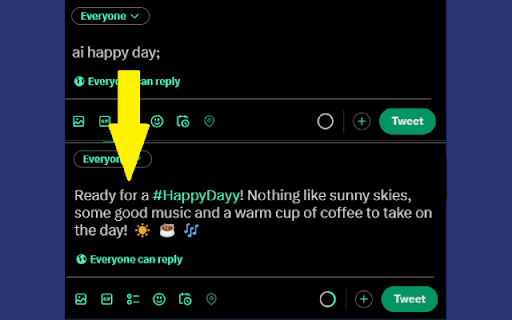
About ContextAI
ContextAI is a powerful Chrome extension that enhances AI-generated responses by leveraging information from the current webpage. Users can generate precise and relevant AI replies by typing commands like "ai;" or "ai <prompt>;". Optimized for platforms such as Twitter and Instagram, it also functions seamlessly across various websites for versatile content creation.
How to Use
Activate ContextAI by typing "ai;" or "ai <prompt>;" directly into a webpage's text input. For example, enter "ai congratulations;" to receive a tailored congratulatory message based on the page content.
Features
- Generates context-aware AI content based on webpage information
- Simple activation using the "ai;" command
- Optimized for social media platforms like Twitter and Instagram
Use Cases
- Finding relevant sources from webpage content
- Creating tailored content for different websites
- Generating timely social media replies
Best For
Content creatorsSocial media managersMarketing professionalsAnyone using AI for content generation
Pros
- Easy to activate with a straightforward command
- Produces accurate and contextually relevant responses
- Compatible with multiple websites
- Streamlines content creation, saving time
Cons
- Performance relies on the quality of webpage information
- Limited to websites with text input fields
- Requires the Chrome browser for optimal use
FAQs
How can I activate ContextAI?
Type "ai;" or "ai <prompt>;" into a webpage's text input to activate.
Which websites are compatible with ContextAI?
It works best on Twitter and Instagram but is compatible with many other sites.
Is my data secure with ContextAI?
The developer states that ContextAI does not collect or share your data.
Do I need a specific browser to use ContextAI?
Yes, it requires the Chrome browser for proper functionality.
Can I customize the prompts used with ContextAI?
Yes, you can input custom prompts after typing "ai" to tailor responses.