

Dessn
AI-driven application enabling designers and product managers to modify UX/UI elements effortlessly, without coding skills.
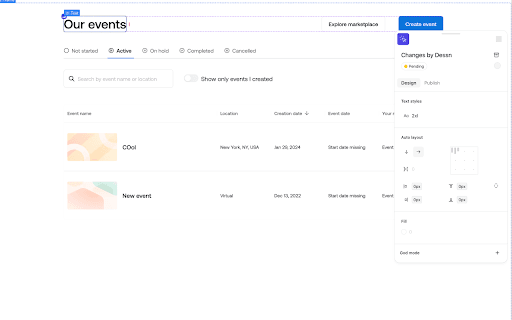
About Dessn
Dessn is an AI-based platform that enables designers and product managers to make direct UX and UI modifications without coding. It accelerates design iterations and reduces dependency on developers for simple updates, empowering teams to implement changes swiftly and efficiently.
How to Use
Designers and product managers can utilize Dessn to directly edit their product’s UX and UI. Its AI-native interface allows seamless modifications without coding, streamlining the design workflow.
Features
- AI-powered UX and UI editing
- Direct modifications by designers and product managers
- No-code interface for seamless UX/UI updates
Use Cases
- Enable non-technical team members to participate in design updates
- Accelerate UX/UI iteration cycles without developer support
- Implement quick copy edits and minor design adjustments
Best For
DesignersProduct ManagersUI/UX teamsDesign teamsProduct teams
Pros
- Speeds up UX/UI design iterations
- Empowers designers and product teams
- Reduces need for developer involvement in minor changes
- Enhances overall design productivity
Cons
- May require training to maximize no-code features
- Limited details on advanced customization options
- Potential learning curve with AI-native interface
FAQs
What is Dessn?
Dessn is an AI-powered platform that allows designers and product managers to directly edit UX and UI elements without coding.
Who can benefit from Dessn?
Designers and product managers seeking to make quick, code-free UX/UI updates to their products.
What are the main advantages of using Dessn?
It accelerates design changes, reduces developer reliance, and empowers non-technical team members to contribute.
Is coding experience necessary to use Dessn?
No, Dessn is designed for users without coding skills, offering a user-friendly, no-code interface.
Can Dessn handle complex design modifications?
It is optimized for quick edits and minor adjustments; complex changes may still require traditional development tools.