

Dokkio Sidebar
Dokkio Sidebar intelligently organizes and tags web pages, files, and messages into a comprehensive, searchable knowledge base, enhancing your digital workflow.
About Dokkio Sidebar
Dokkio Sidebar enriches your browsing experience by automatically tagging web pages, cloud files, and messages. It creates a powerful, searchable knowledge base that helps you organize and access your digital information effortlessly.
How to Use
Install the Dokkio Sidebar Chrome extension to enable automatic analysis and tagging of web pages as you browse. Use the integrated search to quickly locate relevant content across your files, emails, and web pages. The sidebar continuously learns from your activity, offering new tag suggestions and updates on important changes.
Features
- Comprehensive, searchable knowledge base
- Real-time content update alerts
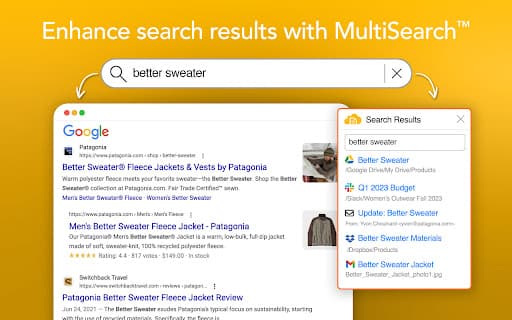
- Multi-Source Search across web, files, and emails
- AI-driven tag recommendations
- Automatic tagging of web pages, files, and messages
Use Cases
- Easily link and embed relevant files during content creation.
- Locate files and documents even if searched incorrectly.
- Keep track of web research and retrieve pages instantly.
- See how emails relate to ongoing projects at a glance.
- Switch focus effortlessly with related content visibility.
Best For
ResearchersContent creatorsKnowledge workersTeam collaboratorsProject managersDigital organizersInformation professionalsProductivity enthusiasts
Pros
- Enhances search across multiple platforms and sources
- Automatically organizes digital content for easy access
- Learns and adapts to individual workflows
- Provides real-time updates on content changes
- Boosts team productivity with shared knowledge management
Cons
- Requires installation of the Chrome extension
- Privacy considerations due to data analysis (review privacy policy)
- Initial setup and configuration needed
- Effectiveness depends on consistent tagging and usage
FAQs
What is Dokkio Sidebar used for?
Dokkio Sidebar automatically tags and organizes web pages, files, and messages into a searchable knowledge base to streamline your digital workflow.
How does Dokkio Sidebar improve team productivity?
It creates a shared knowledge repository and learns from your content, turning individual information into team intelligence.
What are the main features of Dokkio Sidebar?
Key features include automatic tagging, multi-source search, AI-powered suggestions, and real-time content updates.
Is Dokkio Sidebar compatible with all browsers?
Currently, it is available as a Chrome extension, providing seamless integration with Google Chrome browsers.
Does Dokkio Sidebar support cloud file integration?
Yes, it automatically tags and organizes cloud files along with web pages and messages for easy access.