
Downloader for Microsoft™ Text-to-Speech
Microsoft™ Text to Speech offers realistic, high-quality speech synthesis from text, available with an easy-to-use downloadable extension.
About Downloader for Microsoft™ Text-to-Speech
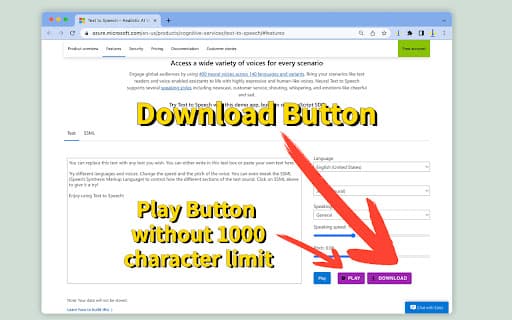
Microsoft™ Text to Speech is a powerful speech service that seamlessly converts written text into natural, lifelike speech. The official website features a demo app for testing speech synthesis, but it lacks a download option. Our extension adds a convenient download button, allowing users to save the generated speech for offline use.
How to Use
Visit the official Microsoft™ TTS website, input your text into the demo tool, and use the extension to download the speech output effortlessly.
Features
- Interactive demo for real-time speech synthesis
- Downloadable extension to save speech files
- Converts text into natural, lifelike audio
Use Cases
- Downloading speech files for offline listening
- Enhancing accessibility with speech outputs
- Creating audio content from written material
- Developing voice applications
- Generating voice prompts for projects
Best For
Accessibility professionalsEducators and studentsContent creators and marketersDevelopers and software engineersVoice application developers
Pros
- Enables downloading of synthesized speech files
- Produces realistic, natural-sounding speech
- Includes a user-friendly demo app for testing
Cons
- Limited details on pricing and advanced features
- Without the extension, speech cannot be downloaded from the official site
FAQs
What is Microsoft™ Text to Speech?
Microsoft™ Text to Speech is a service that converts written text into natural, human-like speech.
How can I download speech generated by Microsoft™ TTS?
You can use our extension to add a download button, enabling you to save the speech files directly from the demo.
Is Microsoft™ TTS suitable for accessibility purposes?
Yes, it provides natural speech synthesis that can enhance accessibility for users with visual impairments.
Can I test Microsoft™ TTS before downloading?
Absolutely, the official website offers a demo app to try out the speech synthesis feature.
What are the main benefits of using the downloadable extension?
It allows you to easily save high-quality speech files for offline use and further processing.