

Email Signature Parser
Chrome extension that leverages AI to extract contact details from Gmail signatures efficiently.
About Email Signature Parser
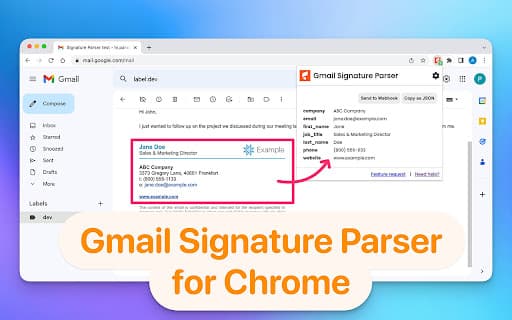
Email Signature Parser is a powerful Chrome extension utilizing ChatGPT to accurately extract structured contact details from Gmail signatures. It seamlessly transfers this information to platforms like Google Sheets, Airtable, webhooks, and Zapier, streamlining contact management. The extension identifies key data such as names, emails, job titles, companies, phone numbers, and websites from email signatures for efficient data handling.
How to Use
Install the Email Signature Parser Chrome extension. It automatically extracts contact information from Gmail signatures in your inbox and allows you to send this data to Google Sheets, webhooks, Airtable, Zapier, and other platforms for streamlined workflows.
Features
- Automatically detects and extracts name, email, job title, company, phone number, and website from email signatures.
- Utilizes AI (ChatGPT) for precise contact data extraction.
- Enables seamless data transfer to Google Sheets, webhooks, Airtable, Zapier, and more.
Use Cases
- Integrate contact details into CRM systems effortlessly.
- Automatically populate and update contact lists from email signatures.
Best For
Pros
- Automates extraction of contact information from email signatures.
- Leverages AI (ChatGPT) for high accuracy.
- Simple to use within Gmail inbox.
- Supports integration with multiple data platforms.
Cons
- Sharing email content with ChatGPT may raise privacy concerns.
- Extraction accuracy depends on email signature quality and format.
- Some fields might not be extracted if absent in signatures.