

Enter Key For ChatGPT
Facilitates sending messages with the Enter key in ChatGPT, Claude, and Wrtn interfaces.
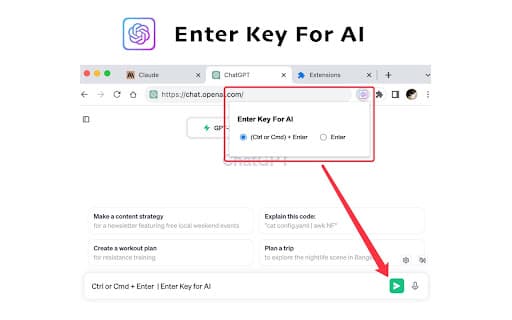
About Enter Key For ChatGPT
This plugin resolves the issue of using the Enter key to send messages within ChatGPT, Claude, and Wrtn, even in small window modes. It supports both Enter and Ctrl/Cmd + Enter shortcuts for seamless messaging.
How to Use
After installing the plugin, refresh the website or restart your browser to activate the keyboard shortcuts and start sending messages with Enter.
Features
- Enables message sending with the Enter key
- Compatible with ChatGPT, Claude, and Wrtn platforms
- Supports Ctrl/Cmd + Enter shortcuts for quick messaging
Use Cases
- Streamline communication workflows with ChatGPT, Claude, or Wrtn
- Send messages instantly without mouse interaction
- Use Enter to send messages efficiently in small or resizable windows
Best For
Claude users seeking efficiencyChatGPT users wanting quick messagingWrtn users needing keyboard shortcutsAnyone preferring keyboard-based messaging
Pros
- Simplifies message sending with the Enter key
- Enhances usability in compact chat windows
- Supports multiple AI platforms for convenience
Cons
- Requires browser refresh or restart after installation
- Necessitates plugin installation to function
FAQs
How can I activate the Enter key to send messages?
Install the plugin, then refresh the website or restart your browser to enable the feature.
Which platforms are compatible with this plugin?
It supports ChatGPT, Claude, and Wrtn interfaces.
Can I use Ctrl/Cmd + Enter to send messages?
Yes, the plugin supports both Enter and Ctrl/Cmd + Enter shortcuts for sending messages.
Is the plugin easy to install?
Yes, simply install, refresh, and start using the feature immediately.
Does this plugin improve small window chat usability?
Absolutely, it ensures the Enter key works reliably even in compact chat views.