

Explain Selected
A browser extension that delivers instant definitions and explanations of selected text using ChatGPT technology, enhancing your reading experience.
About Explain Selected
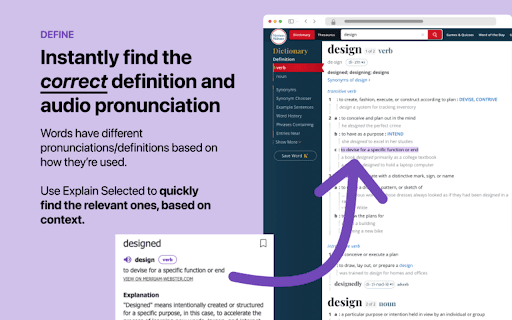
This extension allows you to instantly access Merriam-Webster Dictionary definitions and audio pronunciations by selecting any word or phrase on a webpage. It offers personalized explanations for slang, technical terms, and complex words, improving comprehension. Select a word or phrase, click the purple icon, and receive contextually accurate meanings. Save your favorite selections for quick review or share them with friends. Its advanced disambiguation feature accurately interprets word meanings based on context, making it ideal for understanding words with multiple definitions.
How to Use
Select a word or phrase on any webpage. Click the purple icon that appears to see definitions, pronunciations, and explanations.
Features
- Save words and phrases for easy review and memorization
- Accurately interpret words with multiple meanings using contextual disambiguation
- Get instant Merriam-Webster Dictionary definitions and audio pronunciations
- Receive personalized explanations for slang and technical terminology
- Share your selected words with friends or study groups
Use Cases
- Quickly look up definitions and pronunciation of unfamiliar words
- Enhance vocabulary retention by saving useful words
- Understand the precise meaning of words based on context
- Improve reading comprehension across websites
- Learn technical terms and slang effortlessly
Best For
Pros
- Simplifies understanding slang and technical terms
- Provides clear audio pronunciation
- Enables saving and sharing of words and phrases
- Offers instant, reliable definitions and explanations
- Utilizes contextual disambiguation for precise meanings
Cons
- May not function on tabs opened before extension installation without refreshing
- Requires browser extension installation
- Does not operate on Chrome Web Store pages