

Family Photo Finder
An innovative tool that automatically detects and highlights family members in web page images using facial recognition technology.
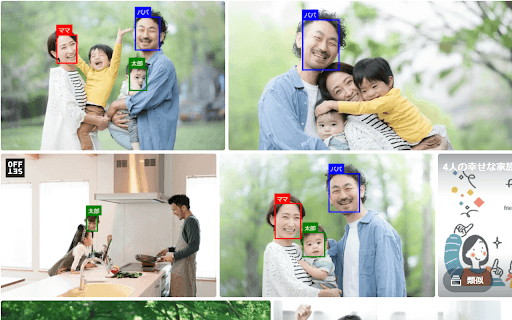
About Family Photo Finder
Family Face Finder is a powerful software that automatically detects and emphasizes family members within web page images by matching pre-registered facial profiles. It scans web content for photos, instantly recognizes registered faces, and highlights them with clear frames. This makes locating family members in online albums or social media photos quick and effortless.
How to Use
Register facial images of your family members in the system. When browsing web pages, the tool automatically scans for these faces and highlights any matches for quick identification.
Features
- Automated face detection and highlighting
- Supports multiple registered faces
- Works seamlessly across web pages
- User-friendly registration process
Use Cases
- Identifying family members in social media photos
- Locating relatives in online photo albums
- Organizing family images for easy access
- Enhancing family photo searches
Best For
Families seeking quick photo identificationIndividuals managing family photo collectionsSocial media usersPhoto enthusiastsFamily historians
Pros
- Speeds up locating family members in photos
- Simple and intuitive interface
- No cost to use
- Focuses on core functionality without distractions
Cons
- Accuracy varies with image quality
- Requires prior registration of facial images
- Less effective with obscured or low-resolution photos
FAQs
Is Family Face Finder free to use?
Yes, it is completely free for all users.
How accurate is the facial recognition feature?
Recognition accuracy depends on the quality of registered images and the photos being scanned. High-resolution, clear images improve results.
Can I register multiple family members?
Yes, you can register multiple faces to identify various family members easily.
Does it work on all websites and photo types?
It works across most web pages and photo formats, provided the faces are visible and clear.
What should I do if the tool doesn't recognize a face?
Ensure the registered facial images are clear and high-quality. Re-registering the face may improve recognition accuracy.