

Flowsage Extension - Turn ideas into shareable flowcharts
AI-enabled Chrome extension that instantly converts selected text into flowcharts and supports smooth team collaboration.
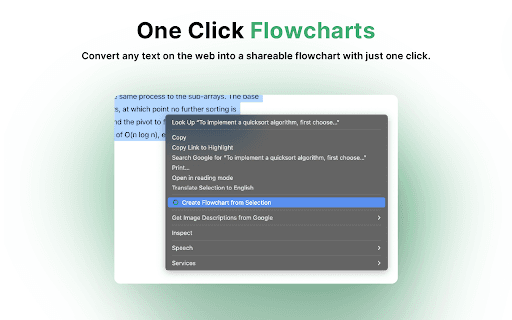
About Flowsage Extension - Turn ideas into shareable flowcharts
The Flowsage Chrome Extension leverages artificial intelligence to transform selected text into detailed flowcharts instantly within your browser. It simplifies the process of creating visual representations by automatically analyzing and converting text, enabling easy customization and sharing on the Flowsage platform for enhanced collaboration and productivity.
How to Use
Highlight any text on a webpage, article, or document. The extension automatically analyzes and converts it into a flowchart, which you can then customize, edit, and share on the Flowsage platform for seamless collaboration.
Features
- One-Click Sharing for Easy Distribution
- Seamless Integration with the Flowsage Platform
- AI-Powered Text-to-Flowchart Conversion
- Intuitive and User-Friendly Interface for Effortless Use
Use Cases
- Brainstorming for creative projects
- Planning events and tracking progress
- Optimizing business workflows
- Visualizing complex educational concepts
Best For
Project ManagersCreative ProfessionalsBusiness TeamsEducatorsStudentsEntrepreneurs
Pros
- Enhances understanding of complex data
- Streamlines workflow automation
- Boosts productivity through quick visualizations
- Supports team collaboration with easy sharing
- Saves time by automating flowchart creation
Cons
- Effectiveness relies on clear input text
- AI accuracy may vary during initial conversion
- Requires a Flowsage account for full features
FAQs
How does the Flowsage Chrome Extension work?
It uses AI to analyze selected text and automatically generate a structured flowchart, which is hosted on the Flowsage platform for further editing and sharing.
Is my data safe with Flowsage?
Yes, Flowsage implements strong security measures to protect your data and keep your flowcharts private.
Can I collaborate with others on flowcharts created with this extension?
Absolutely, flowcharts are stored on the Flowsage platform, allowing real-time team collaboration.