

FormalizeIt
Gmail add-on powered by OpenAI to enhance email professionalism and courtesy.
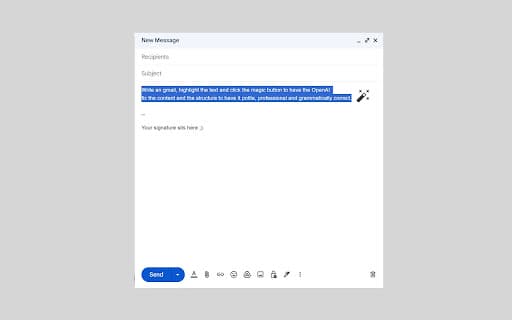
About FormalizeIt
This Gmail add-on utilizes OpenAI technology to help users craft more professional, courteous, and clear emails. It reviews your drafts and offers suggestions to improve tone, grammar, and overall message effectiveness, ensuring respectful and impactful communication.
How to Use
Download and install the add-on from the Google Workspace Marketplace. While composing an email, activate the add-on to analyze your draft. Review the suggested improvements and apply them to boost your email’s professionalism and tone.
Features
- Suggestions for polite language
- Tone analysis and refinement
- Grammar and spelling corrections
- Enhancement of message clarity
- Options to customize writing style
Use Cases
- Making request emails more polite and effective
- Polishing formal client correspondence
- Simplifying complex sentences for clarity
- Refining the tone of sensitive or confrontational emails
Best For
Business professionalsCustomer service teamsProject managersFrequent email communicatorsSales and marketing teams
Pros
- Enhances communication clarity and professionalism
- Streamlines editing and proofreading tasks
- Seamlessly integrates with Gmail
- Boosts email politeness and effectiveness
Cons
- Privacy concerns regarding data sharing with OpenAI
- May require user training to maximize benefits
- Dependent on OpenAI’s accuracy, which can vary
- Effectiveness relies on quality of initial draft
FAQs
How does the add-on improve email tone?
It analyzes your email draft using OpenAI to suggest phrasing that makes your message more polite, professional, or empathetic, aligned with your communication goals.
Is my email data secure when using this add-on?
Data security depends on the add-on's privacy policies and OpenAI's data handling practices. Review these policies to ensure your information remains protected.
Can I customize the tone recommendations?
Yes, the add-on allows you to adjust tone preferences to better suit your communication style and specific email context.
Does this tool support multiple languages?
Currently, the add-on primarily supports English, but future updates may include additional language options.
Will using this add-on slow down my email composing process?
The analysis is quick, and suggestions are provided in real-time, helping you craft polished emails efficiently without significant delays.