

Free Mobile Auto Login
A browser extension that automates the login process for Free Mobile users, providing seamless authentication.
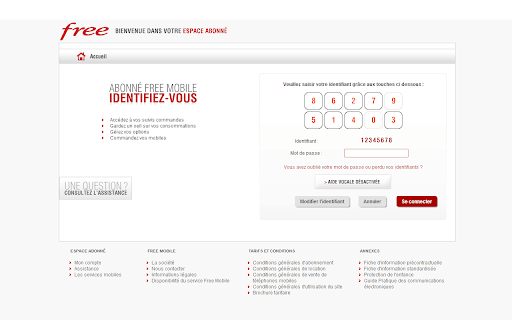
About Free Mobile Auto Login
Free Mobile Auto Login is a user-friendly browser extension that automates entering your Free Mobile identifier on the official website (https://mobile.free.fr/moncompte/). It streamlines the login process by eliminating manual entry of numerical keys, saving you time and effort during authentication.
How to Use
Install the extension, then input your Free Mobile identifier in the settings. The extension will automatically recognize and click the necessary numerical keys on the login page. You can manually update the identifier if needed at any time.
Features
- Streamlines the login process
- Automatically enters your Free Mobile identifier
- Allows manual override for flexibility
Use Cases
- Quick access to Free Mobile account
- Secure and hassle-free login
- Simplifies authentication for mobile users
Best For
Free Mobile subscribersMobile account usersUsers seeking secure login automation
Pros
- Simple to install and operate
- Reduces login time and effort
- Eliminates manual entry of identifiers
Cons
- Security concern if the extension is compromised
- Limited to Free Mobile’s website
- Requires storing your identifier within the extension
FAQs
How do I configure my Free Mobile identifier?
Enter it in the extension settings or click the 'Modify Identifier' button to update it.
Is manual entry of my identifier possible?
Yes, you can override the automatic entry and input a different identifier manually.
Does the extension work on all browsers?
It is compatible with most major browsers supporting extensions, such as Chrome and Firefox.
Is my Free Mobile identifier stored securely?
The extension stores your identifier locally; ensure your device is secure to protect your data.
Can I disable the auto-login feature?
Yes, you can disable or remove the extension at any time to stop automatic login.