

Free Xpath Finder
AI-powered Chrome extension that simplifies locating XPath of webpage elements with ease.
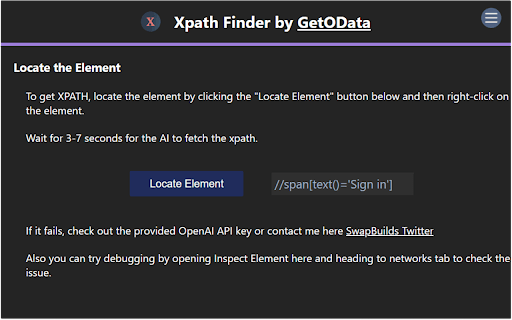
About Free Xpath Finder
XPath Finder is an AI-enhanced Chrome extension created by GetOData.com to streamline the process of identifying XPath for webpage elements. Users can right-click any element and instantly receive its XPath, removing the need for manual XPath creation. This tool is ideal for web scraping, data extraction, and automation professionals seeking efficiency.
How to Use
Install the XPath Finder Chrome extension. Simply right-click any element on a webpage to generate its XPath automatically with a single click.
Features
- AI-driven automatic XPath generation
Use Cases
- Quickly locate XPath for data scraping and automation
- Simplify web element identification for developers
- Enhance efficiency in web automation tasks
Best For
Web developersData extraction professionalsWeb automation engineersQuality assurance testers
Pros
- Reliable XPath generation accuracy
- No cost to use
- User-friendly with right-click functionality
- Speeds up XPath creation process
Cons
- Accuracy depends on extension performance
- Available only on Chrome browser
FAQs
Is XPath Finder a free Chrome extension?
Yes, XPath Finder is available at no cost.
How does XPath Finder assist with web automation?
It quickly provides accurate XPath of webpage elements, making automation easier and more efficient.
Can I use XPath Finder on browsers other than Chrome?
Currently, it is exclusively available for the Chrome browser.
Does XPath Finder require technical skills to operate?
No, it offers a simple right-click feature that anyone can use without technical expertise.
What are the main benefits of using XPath Finder?
It saves time, improves accuracy, and simplifies XPath retrieval for web scraping and automation tasks.