

Gemini AI - Chrome In-built Offline AI Assistant
Offline AI assistant for Chrome utilizing Gemini Nano, perfect for brainstorming, coding, and productivity tasks without internet access.
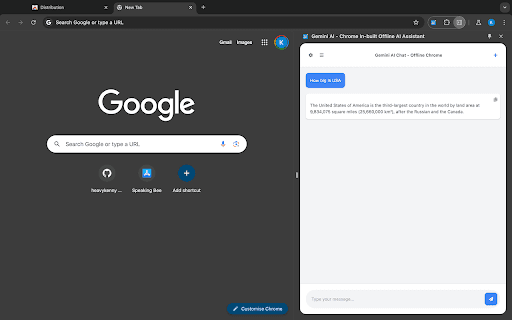
About Gemini AI - Chrome In-built Offline AI Assistant
Gemini AI - the Chrome in-built offline AI assistant, harnesses the power of the Gemini Nano model to deliver advanced AI capabilities directly within your browser. This extension operates entirely offline, ensuring privacy and seamless performance for tasks like coding, writing, and idea generation without internet dependency.
How to Use
Download and install the extension from GitHub, then access it directly in Chrome. Ensure you're using Chrome Dev or Canary version 127.0.6512.0 or newer for optimal functionality.
Features
- Secure, privacy-first data processing
- Instant responses in real-time
- Open-source code for transparency
- Seamless integration with Chrome browser
- Manage and review chat history
- Offline AI assistance for productivity
Use Cases
- Offline writing and content creation
- Debugging and coding without internet
- Quick offline answers to questions
- Brainstorming ideas offline for projects
Best For
Writers and content creatorsStudents and learnersResearchers and academicsSoftware developersProfessionals needing offline AI support
Pros
- Ensures data privacy with local processing
- Integrates smoothly into Chrome
- Operates fully offline without internet
- Provides fast, AI-driven responses
- Open-source, community-supported project
Cons
- Requires Chrome Dev or Canary (version 127.0.6512.0 or newer)
- Developed independently, not officially licensed by Google or Gemini AI
FAQs
Can this extension work offline without internet?
Yes, it functions entirely offline by utilizing Chrome's built-in Gemini Nano model.
Which Chrome version is needed to run this extension?
You need Chrome Dev or Canary version 127.0.6512.0 or newer.
Is this extension officially supported by Google or Gemini AI?
No, it is an independent project not officially affiliated with Google or Gemini AI.
How do I install this Chrome extension?
Download it from GitHub and add it to your Chrome browser following the provided instructions.
Is technical knowledge required to set up the extension?
Basic familiarity with Chrome extensions and developer channels is recommended for setup.