
Gemini Chat Sidebar
AI assistant sidebar designed for seamless conversations, comprehensive content analysis, and intelligent actions using Gemini AI technology.
About Gemini Chat Sidebar
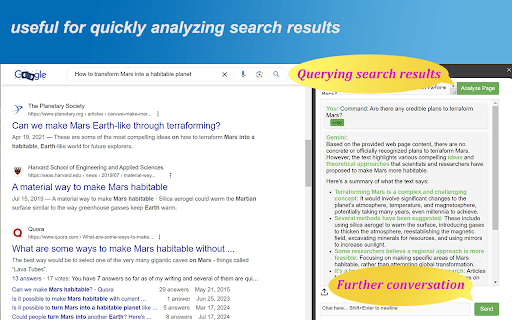
The Gemini Chat Assistant Sidebar enhances your browsing with AI-powered features. Similar to Microsoft Edge's Copilot, it enables natural conversations with Gemini AI, quick webpage content analysis with a single click, and the ability to instruct Gemini to summarize, analyze, or perform other tasks on page content. This tool supports ongoing dialogue, making online research and content management more efficient.
How to Use
Install and pin the extension to your browser toolbar. Enter your Gemini API credentials in the settings. Use the one-click button to analyze webpage content, then interact with Gemini AI for summaries, insights, or other intelligent actions.
Features
- Enables natural, conversational interactions with Gemini AI
- One-click webpage content analysis tool
- Supports continuous, context-aware conversations
- User interface available in multiple languages
- Smart processing of webpage data for insights
Use Cases
- Review analysis of product feedback online
- Translate webpage content instantly
- Create content ideas based on webpage information
- Extract key points from research articles
- Summarize lengthy blog posts and articles
Best For
Pros
- Quick content analysis with a single click
- Easy integration of AI assistance within your browser
- Supports summarization, translation, and content generation
- Available in multiple languages for global users
Cons
- Requires a Gemini API key with potential usage limits
- API setup may require technical knowledge
- Performance varies with Gemini model availability and quality