

Gini
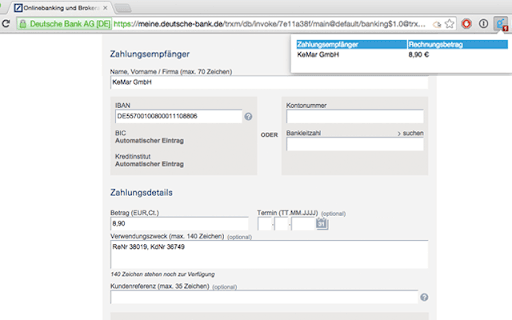
Gini streamlines invoice processing by automatically converting invoices into pre-filled bank transfer forms.
About Gini
Gini simplifies your financial workflow by transforming emails and PDF invoices into ready-to-use, pre-filled transfer forms with a single click. Enhance efficiency and accuracy in your payment processes.
How to Use
Upload your invoice via email or PDF to Gini. The platform automatically extracts key data and generates a pre-filled transfer form for quick payment.
Features
- Automated extraction of invoice data
- Generation of pre-filled bank transfer forms
Use Cases
- Streamlining invoice payments
- Reducing manual data entry
- Accelerating financial workflows
- Minimizing payment errors
Best For
AccountantsBookkeepersSmall business ownersFreelancersFinance teams
Pros
- Speeds up invoice payments significantly
- Automates data entry to save time
- Enhances accuracy by reducing manual errors
Cons
- Effectiveness depends on invoice quality and format
- Full features may require a subscription
FAQs
How does Gini convert invoices into transfer forms?
Gini uses advanced OCR technology and AI to extract invoice data and automatically fill transfer forms.
Is Gini suitable for small businesses?
Yes, Gini is ideal for small businesses seeking to automate invoice payments and improve efficiency.
What types of invoices does Gini support?
Gini supports email invoices and PDF attachments, regardless of format, provided the data is legible.
Does Gini require integration with accounting software?
Gini can operate independently or integrate with popular accounting platforms for seamless workflows.
What are the main benefits of using Gini?
Gini speeds up payment processing, reduces manual effort, and minimizes errors in invoice handling.