

GitHub Sage
An AI-powered assistant embedded in a GitHub side panel to answer questions about your repositories quickly and accurately.
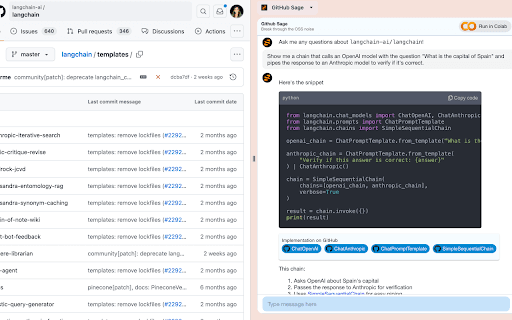
About GitHub Sage
This extension adds a side panel to your GitHub interface, allowing you to interact with an AI assistant about your repositories. It helps you understand project details, recent updates, and assess open-source projects efficiently. Note that this is a third-party tool and not an official GitHub product.
How to Use
Install the extension, open a GitHub repository, and activate the side panel to ask questions about your codebase, recent changes, or project structure.
Features
- AI-driven answers for GitHub repositories
- Convenient side panel integration
- Supports both open-source and private repositories
Use Cases
- Review recent updates in your private repositories
- Evaluate open-source projects for suitability
- Gain quick insights into complex codebases
- Understand code structure and functionality
Best For
Software developersTechnical leadsOpen-source contributorsSoftware architectsProject managers
Pros
- Simplifies understanding complex codebases
- Speeds up project evaluation process
- Ideal for both open-source and private repositories
- Provides instant answers without manual digging
Cons
- Not an official GitHub product, so reliability varies
- Accuracy depends on AI training and understanding
- Limited to AI-generated responses, potential for errors
- May struggle with highly specialized or nuanced questions
FAQs
What types of questions can I ask the AI assistant?
You can inquire about repository purpose, code structure, recent changes, and overall project details.
Is this an official GitHub feature?
No, this is a third-party extension and not officially supported by GitHub.
How does the AI assistant help with code reviews?
It provides quick summaries and insights into code changes, aiding faster understanding during reviews.
Can I use this for private repositories?
Yes, it supports private repositories, helping you analyze your own projects securely.
Is there a cost to use this extension?
Pricing details are not specified; please check the extension's official page for updates.