

Glowify - Your Reading Assistant
Advanced web highlighting tool that helps you capture, comprehend, and organize online information efficiently.
About Glowify - Your Reading Assistant
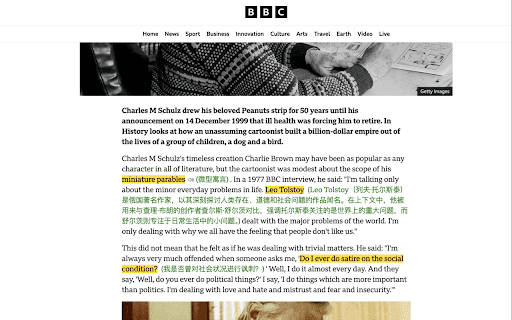
Glowify is a smart web highlighting application designed to improve your online reading experience. It enables you to capture important information, add notes, translate text, and access AI-driven explanations. With seamless integration to Notion, you can effortlessly sync and organize your highlights across devices.
How to Use
Select text on any webpage to highlight it. Add comments, translate, or request AI explanations. You can also sync highlights with Notion and toggle their visibility as needed.
Features
- Contextual AI explanations
- Intelligent text selection
- Seamless Notion integration
- Real-time translation
- Highlight visibility toggle
- Add customized comments
- Pronunciation audio feature
- Dedicated side panel for highlights
Use Cases
- Students can organize research highlights for easy review
- Language learners translate and pronounce words instantly
- Professionals capture and clarify key information from articles
Best For
Online researchersLanguage learnersKnowledge professionalsStudentsContent creators
Pros
- Syncs effortlessly with Notion for organized note management
- Offers translation and AI explanations for better understanding
- Operates offline, ensuring privacy and accessibility
- Improves reading comprehension and memory retention
- Simple interface for toggling highlights
Cons
- Requires a Notion account for full integration
- AI explanations vary in accuracy
- Mainly focused on highlighting and related features
FAQs
Is Glowify safe for my privacy?
Yes, Glowify prioritizes your privacy by functioning offline by default. Your highlights are stored locally until you choose to sync them with cloud services.
What features does Glowify offer?
Glowify allows text highlighting, adding comments, translating text, accessing AI explanations, syncing highlights with Notion, and toggling their visibility for efficient online reading.
Can I use Glowify offline?
Yes, Glowify works offline by default, enabling you to highlight and annotate content without an internet connection.
How does Notion integration work?
You can sync your highlights and notes directly to Notion, allowing seamless organization and access across your devices.
Is Glowify suitable for language learners?
Absolutely. It helps translate, pronounce, and understand new vocabulary directly on web pages.