

Gmail Auto BCC
Automates the addition of CC and BCC recipients in Gmail based on customizable rules to enhance email efficiency.
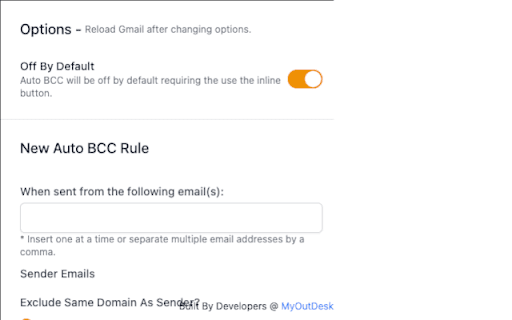
About Gmail Auto BCC
Enhance your Gmail workflow with Automatic CC & BCC. This tool automates adding recipients based on customizable rules, supports multiple senders, and ensures your emails include the right people. It offers a distraction-free, ad-free experience designed to boost productivity and streamline communication.
How to Use
Set up personalized rules based on sender details to automatically include CC and BCC recipients in new emails and replies within Gmail.
Features
- Automatically populate CC and BCC fields for new emails and replies
- Provides a clean, ad-free, distraction-free environment
- Supports multiple email accounts seamlessly
- Customizable rules for specific sender and recipient scenarios
Use Cases
- Add a manager automatically to all emails from a specific address
- Ensure copies of invoices are sent to the accounting team
- Automatically BCC supervisors on project updates
- Include legal team on sensitive client communications
Best For
Email professionals managing multiple accountsCustomer support teams automating responsesExecutives overseeing communicationsSales teams streamlining outreachAdministrative staff automating message deliveryProject managers coordinating team emails
Pros
- Helps prevent missing important recipients in emails
- Offers an ad-free, privacy-conscious experience
- Flexible rules for tailored automation
- Boosts overall Gmail productivity
- Easily supports multiple email accounts
Cons
- Limited to CC and BCC automation functionalities
- Requires initial setup and rule configuration
FAQs
What is the main function of Automatic CC & BCC for Gmail?
It automatically adds CC and BCC recipients based on your custom rules, saving time and ensuring important contacts are included.
Can I create different rules for multiple email addresses?
Yes, the tool supports multiple sender accounts, allowing you to set unique rules for each.
Is this tool compatible with all Gmail accounts?
Yes, it works with standard Gmail accounts and G Suite (Google Workspace) accounts.
Does this automation affect the confidentiality of my emails?
No, it operates within your Gmail environment without compromising privacy or security.
Is there a free trial available?
Pricing details are not provided; please check the official website for trial options or subscription plans.