

Google Meet 字幕記錄器
Free Google Meet meeting recorder with AI-powered translation and subtitle extraction features.
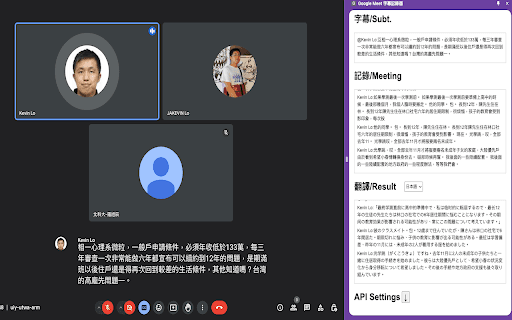
About Google Meet 字幕記錄器
This free tool enables recording Google Meet sessions with automatic subtitle extraction. Activate captions and select your meeting language to capture subtitles seamlessly. It supports real-time translation via AI, with options to use OpenAI or local AI services like Ollama and LM Studio for privacy. Ensure captions are enabled for optimal performance and choose your preferred AI platform accordingly.
How to Use
Enable captions in Google Meet, select the meeting language, and the tool will automatically record and extract subtitles. Set up your preferred AI service—OpenAI or local AI—for real-time translation.
Features
- Automatic extraction of meeting subtitles
- Supports real-time AI translation
- Option to use local AI for enhanced privacy
- Supports multiple languages
Use Cases
- Generating accurate meeting transcripts for documentation
- Recording and translating Google Meet sessions for global teams
- Enabling multilingual meetings with instant translation
Best For
Business professionalsProject managersResearchersStudentsInternational teams
Pros
- Simple setup and user-friendly interface
- Supports both OpenAI and local AI options
- Automatically captures meeting subtitles
- Free to use without subscription fees
- Provides real-time AI translation
Cons
- Requires captions to be enabled in Google Meet
- Translation quality depends on AI model performance
- Performance may vary based on API or local AI service used
FAQs
Is this tool free to use?
Yes, this is a completely free tool for recording and transcribing Google Meet meetings.
How do I set up and use the tool?
Enable captions in Google Meet, select your meeting language, and the tool will automatically record and extract subtitles. Choose your AI translation service for real-time translation.
Which AI platforms are compatible?
The tool supports OpenAI, compatible API platforms, and local AI services like Ollama and LM Studio for enhanced privacy.
Can I use this tool for confidential meetings?
Yes, by selecting local AI services, you can keep your meeting data private and secure.
What languages are supported for translation?
The tool supports multiple languages, enabling translation for diverse international meetings.