

GPT API Companion
A Chrome extension that summarizes web pages using GPT API and enables interactive questioning.
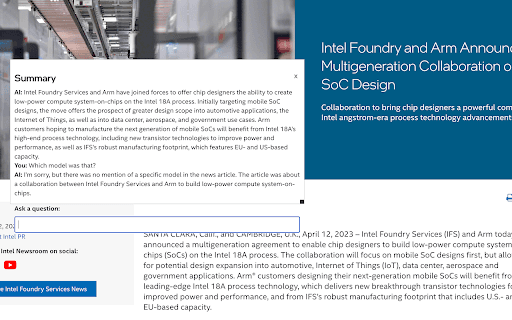
About GPT API Companion
GPT API Companion is a Chrome extension designed to help users quickly summarize web pages and ask questions about their content. It securely integrates with chat.lit.codes for token management and encrypted chat history, ensuring user privacy throughout interactions.
How to Use
Install the extension, generate an OpenAI API key, enter it in the options at chat.lit.codes, then use the extension to summarize pages or selected text effortlessly.
Features
- Ask detailed questions about summarized web content
- Secure, end-to-end encrypted chat history
- Supports GPT-3.5 and GPT-4 models for versatile AI interactions
- Easy API token management via options page
- Quickly generate summaries of web pages with GPT API
Use Cases
- Answer specific questions about webpage content
- Keep an encrypted history of your summaries
- Gain quick insights into web page information
Best For
Research professionalsContent creatorsAcademic researchersStudents seeking quick summariesAnyone needing fast web page understanding
Pros
- Open-source with full transparency (GitHub source code)
- Ensures privacy with end-to-end encrypted chat history
- Enables interactive Q&A about web content
- Conveniently summarizes pages within Chrome browser
- Compatible with GPT-3.5 and GPT-4 models
Cons
- Dependent on chat.lit.codes for token and history management
- Losing your API key may result in data loss
- Initial setup requires configuration
- Requires an OpenAI API key, which incurs costs
FAQs
How can I obtain an OpenAI API key?
Generate your API key on the OpenAI platform at https://platform.openai.com/account/api-keys. Note that API usage may incur charges.
Where is my chat history stored?
Chat histories are stored on chat.lit.codes servers with end-to-end encryption using your API token. Losing the token means losing access to previous chats.
How do I configure the API token for the extension?
Visit the options page at https://chat.lit.codes/options to securely set and manage your API token.
Is this extension free to use?
The extension itself is free, but using OpenAI's API may incur costs based on your usage.
Which web browsers support this extension?
It is designed specifically for Google Chrome and Chromium-based browsers for optimal performance.