

GPT Input History Manager
A Chrome extension designed to streamline ChatGPT input management and provide quick access to conversation history.
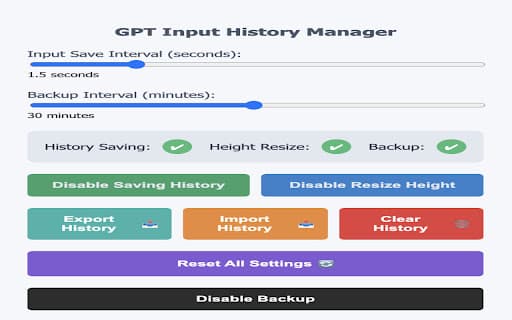
About GPT Input History Manager
GPT Input History Manager is a powerful Chrome extension that enhances your ChatGPT experience by automatically saving your inputs, making past conversations easily accessible, and offering features like customizable shortcuts, resizable input areas, and data export options. Improve your workflow with efficient chat management tools.
How to Use
Install the Chrome extension, activate the 'History' feature, and use customizable shortcut keys (such as Shift + Command + Arrow Keys) to navigate your input history. Adjust settings and export your chat data as needed for optimal productivity.
Features
- Easy navigation of input history
- Customizable shortcut keys for quick access
- Automatically saves chat inputs
- Export chat history for backups
- Efficient management of chat conversations
- Resizable input text area for comfort
Use Cases
- Carry over chat history across multiple sessions
- Adjust input area size for better visibility
- Manage and reuse previous inputs efficiently
Best For
Writers seeking quick input recallCustomer support representativesResearchers analyzing chat dataFrequent ChatGPT usersDevelopers automating workflowsContent creators managing ideas
Pros
- Automatically records chat inputs for easy retrieval
- Enables seamless sharing of history between chats
- Customizable shortcuts tailored to your workflow
- Supports exporting chat data for backup and analysis
- Manages chat history proactively to optimize performance
- Includes a resizable input box for enhanced comfort
Cons
- Potential privacy issues if data isn't stored locally
- Shortcut keys may conflict with other applications
- Requires Chrome browser to operate
- Extension installation is necessary for full functionality
FAQs
How does GPT Input History Manager improve my ChatGPT experience?
It automatically saves your inputs, provides quick access to past conversations, and includes features like history navigation and a resizable input area for a smoother workflow.
Can I customize shortcut keys?
Yes, you can personalize shortcut keys to suit your preferences, enhancing your efficiency.
How do I export my chat history?
You can easily export your chat data as a JSON file for backups or further analysis.
Is this extension compatible with all Chrome versions?
It works with most recent versions of Chrome; ensure your browser is up-to-date for optimal performance.
Does the extension store data locally or online?
All chat data is stored locally on your device, ensuring your privacy and security.