

GPTAvatorChanger
Personalize your ChatGPT experience by customizing the ChatGPT icon on chatgpt.com for a unique interface.
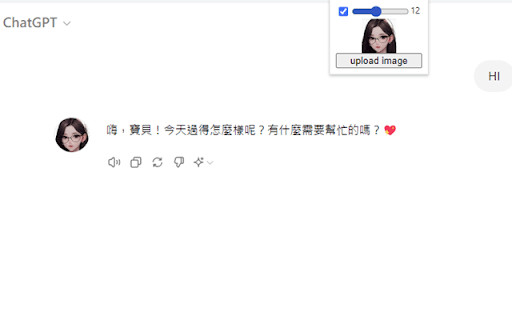
About GPTAvatorChanger
This tool enables you to replace the default ChatGPT icon on chatgpt.com, allowing for a tailored user interface. Enhance your browsing experience by customizing the appearance to match your preferences.
How to Use
Install the compatible browser extension or apply the script to your browser. Follow the prompts to select and set a new icon, replacing the default ChatGPT icon for a customized interface.
Features
- Allows icon customization for ChatGPT on chatgpt.com
Use Cases
- Personalize ChatGPT's visual appearance
- Enhance user interface with custom icons
- Create a unique browsing experience for ChatGPT
- Modify ChatGPT branding to suit personal style
Best For
ChatGPT users seeking personalizationTech-savvy usersDigital enthusiastsIndividuals customizing their online workspaceCreative professionals
Pros
- Creates a distinctive visual interface
- Enables personalized user experience
- Simple to implement with the right tools
Cons
- Limited to icon customization only
- May require technical skills to install
- Possible compatibility issues with ChatGPT updates
FAQs
How does this tool customize ChatGPT?
It replaces the default ChatGPT icon with a user-selected image for a personalized look.
Is this tool compatible with all browsers?
It works with most modern browsers that support extensions or scripts, such as Chrome and Firefox.
Do I need technical knowledge to use this?
Basic technical skills are recommended to install extensions or scripts, but detailed instructions are provided.
Will updating ChatGPT affect the customization?
Future updates may impact the customization, requiring reapplication or adjustments.
Can I revert to the original icon?
Yes, simply disable or remove the extension or script to restore the default icon.