

GPT帮我翻译
An efficient translation tool powered by ChatGPT for text and images.
About GPT帮我翻译
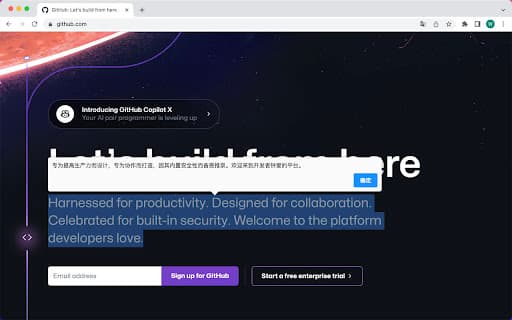
This versatile tool enables quick translation of selected text and images using ChatGPT. It integrates options into the right-click menu for translating text to Chinese or English and for translating image text to Chinese. Keyboard shortcuts facilitate fast access to translation features.
How to Use
1. Highlight the desired text, right-click, and select 'GPT Translate' > 'Translate to Chinese' or 'Translate to English' to convert the text. 2. Right-click on an image and choose 'Translate Image to Chinese' to extract and translate image text. 3. Press Cmd/Ctrl + M to quickly translate text to Chinese using the keyboard shortcut.
Features
- Translate text directly from right-click menu
- Translate images by extracting embedded text
- Quick translation with keyboard shortcuts
Use Cases
- Extract and translate text from images effortlessly
- Rapidly translate selected webpage content
- Aid language learners with quick translations
Best For
Language studentsFrequent translatorsResearchers working with foreign documentsTravelers needing quick translationsMultilingual content creators
Pros
- Easy right-click translation options
- Fast access via keyboard shortcuts
- Powered by advanced ChatGPT technology
- Supports both text and image translation
Cons
- Dependent on ChatGPT's service availability and accuracy
- Requires ChatGPT API integration or subscription
- Limited language pairs to Chinese and English
FAQs
Which languages does this tool support?
It supports translation between Chinese and English.
How accurate are the translations?
Translation quality depends on ChatGPT's language processing capabilities.
How can I access translation features?
Right-click on selected text or images, or press Cmd/Ctrl + M for quick translation.
Does this tool work with all websites?
Yes, it functions on most websites supporting right-click menu options.
Is there a cost for using this translation tool?
Pricing details depend on ChatGPT API usage, but the tool itself offers basic features at no extra charge.