

hahaOCR
Easily extract text from images and exit quickly with the ESC key.
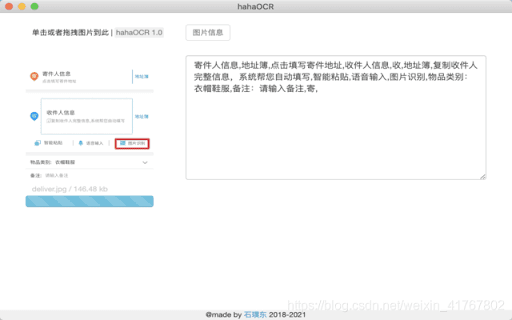
About hahaOCR
This user-friendly application allows you to extract text from images and convert it into editable documents. Simply upload your images and press 'ESC' to close the app instantly.
How to Use
Click the upload button to select your image. The app automatically extracts the text and displays it. Press the 'ESC' key to close the application smoothly.
Features
- Converts images to editable text
- Quickly exits with the ESC key
Use Cases
- Digitizing scanned documents
- Fast application exit with ESC
- Converting text images into editable formats
Best For
StudentsOffice professionalsResearchersData entry specialists
Pros
- Intuitive and straightforward interface
- Fast exit with the ESC key
- Transforms image-based text into editable content
- Easy image upload process
Cons
- Accuracy affected by image quality
- Does not support in-app text editing
- Limited support for some image formats
FAQs
How can I upload an image?
Click the upload button and select an image file from your device.
How do I close the application?
Press the 'ESC' key to exit the app instantly.
Which image formats are compatible?
The app supports common formats like JPG, PNG, and GIF.
Is the text extraction accurate?
Accuracy depends on the quality and clarity of the uploaded image.
Can I edit the extracted text within the app?
No, the app only extracts and displays text; editing is not supported.