

Hellooo for Chrome
A powerful Chrome extension designed to record, transcribe, and analyze user interviews conducted via Google Meet, enhancing research efficiency.
About Hellooo for Chrome
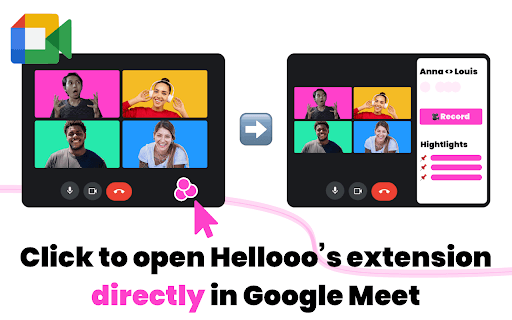
Hellooo for Chrome is an innovative browser extension that enables seamless recording and transcription of user interviews on Google Meet. It allows users to highlight important moments, clip and share insights effortlessly via Slack or Notion, and leverages AI to provide summarized insights with sentiment analysis, streamlining the user research process.
How to Use
Install the Chrome extension, sign in with your professional email, activate your account, then start recording and analyzing your user interviews in Google Meet.
Features
- Highlight and flag key moments during interviews
- Record and transcribe interviews directly in Google Meet
- Easily clip and share insights via Slack or Notion
- AI-powered summaries with sentiment analysis for quick insights
Use Cases
- Product Development
- User Experience Research
- Customer Feedback Collection
- Market Research
- Usability Testing
Best For
UX ResearchersProduct ManagersProduct DesignersMarket AnalystsCustomer Experience Teams
Pros
- Simplifies sharing key insights with team members
- Integrates smoothly with Google Meet, Slack, and Notion
- Enhances the efficiency of user interview workflows
- Utilizes AI for accurate analysis and summaries
Cons
- Accuracy depends on AI transcription and sentiment analysis quality
- Limited to Chrome browser only
- Requires Google Meet for recording sessions
FAQs
What is Hellooo for Chrome and how does it help?
Hellooo for Chrome records and transcribes user interviews on Google Meet, highlights key moments, and provides AI-generated summaries and sentiment analysis to streamline research.
Which platforms does Hellooo for Chrome support for sharing insights?
It integrates with Slack and Notion, allowing quick sharing of clips and summarized insights from interviews.
How can I get started with Hellooo for Chrome?
Download and install the extension, sign in with your professional email, activate your account, then begin recording and analyzing interviews on Google Meet.
Is Hellooo for Chrome compatible with all browsers?
No, it is designed specifically for the Chrome browser to ensure optimal performance.
Can I use Hellooo for Chrome on multiple devices?
Yes, as long as you install the extension on Chrome browsers across your devices and sign in with your account.