

Highlighter for TrendsCritical.com
Chrome extension that enhances web highlighting with AI-powered trend analysis and insights.
About Highlighter for TrendsCritical.com
The TrendsCritical Highlighter Chrome extension elevates web highlighting by integrating AI-driven trend analysis. Users can privately highlight web content, store highlights locally, and connect with TrendsCritical.com to analyze and extract actionable insights from their highlights. It supports productivity, research, and workflow optimization through curated trend data.
How to Use
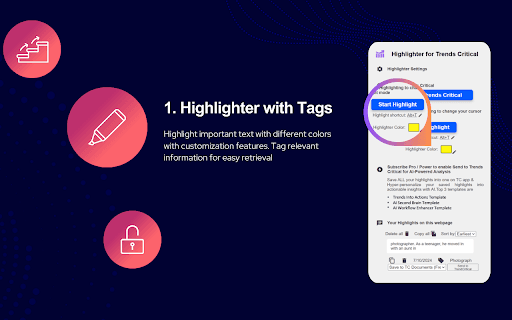
Install the Chrome extension, optionally log in, then highlight text via keyboard shortcut, right-click menu, or the 'Start/End Highlight' buttons. Save and manage highlights locally or sync with TrendsCritical.com for AI-driven insights.
Features
- Customizable highlight colors and keyboard shortcuts for efficient highlighting
- Predefined document templates for organized highlight saving
- AI-powered analysis of highlights using GPT-4 and other models
- Seamless integration with TrendsCritical.com for advanced analysis
- Local storage of highlights for privacy and offline access
- Access to AI templates focused on workflows, trends, and productivity
- Secure, private web highlighting without sharing data
Use Cases
- Using AI to analyze highlights and extract key insights
- Enhancing productivity by leveraging trend analysis
- Converting trend research into actionable strategies
- Highlighting essential information on web pages for research
Best For
Productivity enthusiastsWorkflow managersResearch professionalsTrend analystsContent creatorsStrategic plannersData analysts
Pros
- Includes AI analysis and customizable templates
- Integrates with current trend data sources
- Enables AI-powered insights from highlights
- Supports multiple highlighting methods for flexibility
- Offers customizable highlight options to suit user preferences
- Simple and intuitive Chrome extension interface
Cons
- Highlights are not synchronized across multiple devices
- Default templates may change without prior notice
- Highlight restoration may not work on dynamic or updated web pages
- Full AI analysis features require a TrendsCritical.com account
FAQs
Is a ChatGPT or Claude account required to use AI features?
No, AI features do not require a ChatGPT or Claude account. Free users can earn up to 1,000 AI analysis credits by signing up on the app.
Which language models are used for AI analysis?
The extension automatically selects the best model for each template, including GPT-4, GPT-3.5, Claude, or Bard.
Can the top three document templates be changed?
Yes, the top three templates can be customized or reordered at any time as the app receives updates.
Does the extension work offline?
Yes, highlights are stored locally, allowing offline access and privacy without internet dependency.
What are the key benefits of using this extension?
It streamlines web highlighting, offers AI-driven insights, and integrates with trend analysis tools to improve research and productivity.