

HLAI
Chrome extension that delivers instant AI-powered explanations of highlighted text for seamless web browsing.
About HLAI
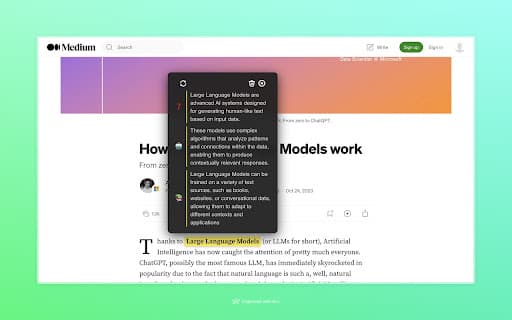
HLAI is a user-friendly Chrome extension that provides immediate, AI-driven explanations for any highlighted text on a webpage. By pressing [CTRL] or [CMD] and selecting text, users can hover over their selection to quickly grasp complex terms and sentences, enhancing comprehension while browsing. This tool simplifies understanding difficult content efficiently.
How to Use
To utilize HLAI, press [CTRL] or [CMD], highlight the desired text, then hover your cursor over the selection to view the AI-generated explanation instantly.
Features
- Response times under one second
- Real-time explanations for highlighted text
- Ability to save responses for later review
Use Cases
- Clarify complex sentences without leaving the webpage
- Enhance understanding of academic or technical content
- Quickly learn unfamiliar terms during online reading
Best For
StudentsResearchersOnline content readersProfessionalsLifelong learners
Pros
- Provides rapid, AI-powered explanations
- Saves time by avoiding separate searches
- Easy to operate with simple highlighting and hovering
- Helps improve comprehension quickly
Cons
- Limited to selectable text only
- Requires Chrome extension installation
- AI explanations may occasionally be inaccurate
FAQs
How can I activate HLAI?
Hold [CTRL] or [CMD], highlight the text, then hover over it to see the explanation.
Is my data safe with HLAI?
The developer assures that HLAI does not collect or use your personal data.
Is HLAI free to use?
There is no current information about pricing, so it is likely free.
Can I save explanations for later?
Yes, HLAI allows you to save responses for future reference.
What types of content can HLAI explain?
HLAI explains highlighted text such as complex sentences and technical terms.