

HtmlToClaude
A browser extension designed to enhance your interactions with Claude AI by enabling easy HTML content capture from any webpage.
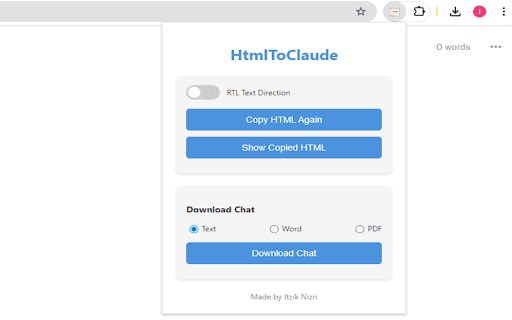
About HtmlToClaude
HtmlToClaude is a powerful browser extension that simplifies your interactions with Claude AI. It allows users to quickly capture HTML content from any webpage and seamlessly paste it into their AI conversations. The extension enhances productivity by enabling easy HTML extraction, supporting multiple download formats, and providing text direction toggling for multilingual support, making it ideal for researchers and writers alike.
How to Use
Install the HtmlToClaude browser extension. Visit any webpage to extract and copy HTML content. Paste the content into Claude AI's input box. Download conversations in text, Word, or PDF formats. Use the text direction toggle to support different languages as needed.
Features
- Switch between LTR and RTL text directions
- Download AI conversations in multiple formats (text, Word, PDF)
- Capture and copy HTML content from web pages
- Paste HTML content directly into Claude AI input field
Use Cases
- Writers can incorporate web content into their projects efficiently.
- Researchers can share web data easily with Claude AI for analysis.
Best For
Pros
- Streamlines web content sharing with Claude AI
- Supports multiple download formats for conversations
- Boosts workflow efficiency for researchers and writers
- Provides language support with easy text direction toggling
Cons
- HTML content quality influences extraction effectiveness
- Limited to enhancing interactions with Claude AI only