

hyperDart Search
HyperDart is a Chrome extension that delivers intelligent answer cards for faster, more efficient search experiences.
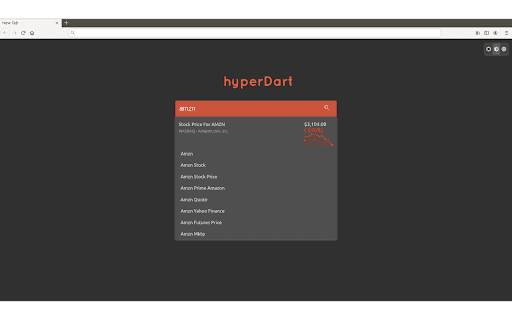
About hyperDart Search
HyperDart is a powerful Chrome extension that provides smart answer cards in response to your search queries. It helps users find accurate information quickly by displaying results from trusted data sources directly within search pages. The extension also features intelligent autocomplete and suggestion tools to streamline your search process.
How to Use
Install the HyperDart Chrome extension. When searching via the browser's omnibox or on a new tab with HyperDart, answer cards from partner providers will appear alongside traditional search results for quick access.
Features
- Intelligent autocomplete and search suggestions
- Customizable themes including light, dark, and blackout modes
- Smart answer cards from trusted data sources
Use Cases
- Quickly finding answers without browsing multiple websites
- Enhancing research efficiency
- Streamlining information gathering for students and professionals
Best For
Professionals seeking quick insightsResearchers needing fast data accessStudents conducting efficient searchesAnyone who values rapid information retrieval
Pros
- Speeds up access to relevant information
- Reduces the need to visit multiple links
- Offers customizable visual themes
- Provides intelligent search suggestions
- Displays answers from reputable sources
Cons
- Requires installing a browser extension
- Depends on partner data providers for answer cards
- Sets Bing as the default search engine
FAQs
What changes occur after installing HyperDart?
The extension updates your search settings and sets Bing as the default search engine.
Where can I review the Terms of Use and Privacy Policy?
Access the Terms of Use at https://about.hyperdart.com/terms-and-conditions/ and Privacy Policy at https://about.hyperdart.com/privacy-policy/.
How can I contact support or send feedback?
Support and feedback can be provided through https://about.hyperdart.com/contact/.