

Idb crud
Chrome extension that simplifies IndexedDB management with intuitive CRUD functionality.
About Idb crud
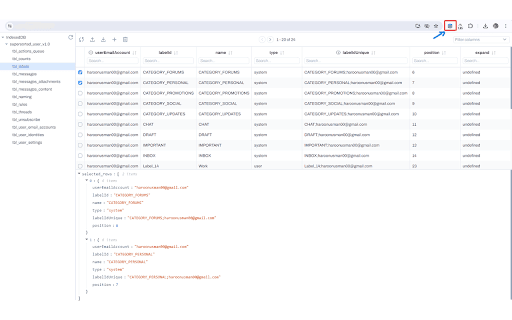
IDB CRUD Assistant is a powerful Chrome extension designed to streamline IndexedDB management. It features an easy-to-navigate drawer interface, enabling developers and users to effortlessly perform create, read, update, and delete operations on any website's IndexedDB. This tool provides quick, secure access to database data, making web development and debugging more efficient. Simplify your IndexedDB tasks with IDB CRUD Assistant — your comprehensive solution for database interaction on the go.
How to Use
Install the IDB CRUD Assistant Chrome extension. After installation, access the drawer interface to connect with any website’s IndexedDB. Use the interface to create, read, update, or delete database records easily.
Features
- Display IndexedDB data in organized table format
- Perform create, read, update, and delete operations on IndexedDB records
- Export data as JSON or CSV files (feature not available in the current version)
- User-friendly, clean interface
- Sort and filter data by all columns
- Hide or show specific table columns
- Convenient drawer interface for database management
Use Cases
- Manage IndexedDB data efficiently across websites
- Simplify complex web-based database tasks
- Debug and test IndexedDB interactions seamlessly
Best For
Pros
- Enables CRUD operations directly within the browser
- Intuitive interface simplifies database management
- Advanced sorting and filtering options
- Column filtering enhances data focus
- Visual table display of database contents
Cons
- Lacks user reviews to assess reliability and performance
- Export options for JSON and CSV are unavailable in this version