

Image to Text (Using AI)
A browser extension that leverages AI technology to automatically generate descriptive captions for images, enhancing accessibility and content engagement.
About Image to Text (Using AI)
Image to Text is a powerful browser extension that uses artificial intelligence to create accurate captions for images. It harnesses advanced machine learning frameworks like Transformers.js and VIT-GPT2 to analyze images and generate relevant textual descriptions, boosting accessibility and content clarity.
How to Use
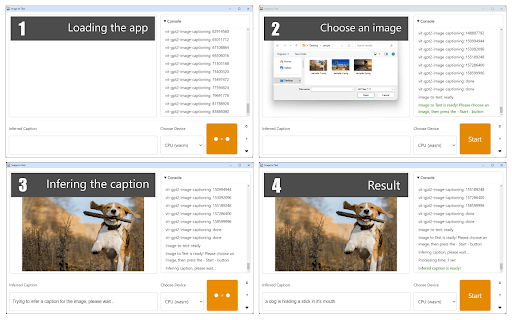
To operate the extension, click its toolbar icon to open the interface. Upload an image using the file selector, then click the 'Start' button. The AI engine will quickly generate a caption displayed at the bottom of the interface.
Features
- Automated AI-driven image captioning
Use Cases
- Enhancing website accessibility with automatic image descriptions
- Improving social media engagement through descriptive captions
- Assisting web developers in creating accessible content
- Supporting bloggers and content creators with quick image descriptions
- Facilitating better content management with caption generation
Best For
Accessibility advocatesSocial media managersWeb developersBloggersContent creatorsDigital marketersAssistive technology users
Pros
- Automates caption creation using advanced AI
- User-friendly interface for quick operation
- Built on trusted machine learning libraries for reliable results
Cons
- Potential delays or freezes during caption generation
- Still evolving with ongoing improvements
- Generated captions may occasionally lack accuracy
FAQs
How can I generate image captions with this extension?
Click the toolbar icon, upload your image, then press 'Start' to receive an AI-generated caption.
Which AI technologies power this extension?
It uses Transformers.js and VIT-GPT2 to analyze images and generate descriptive captions.
What should I do if the caption is inaccurate?
Since the extension is still being refined, some captions might be imperfect. Please report issues to help improve its accuracy.
Is this extension easy to install?
Yes, simply add it to your browser's extensions and access it via the toolbar for quick image captioning.
Can I use this extension on any website?
Yes, it works with images on most websites, making accessibility and content creation easier.