

Inquiry Assist
An efficient tool designed to automate form completion and streamline contact list management for sales teams.
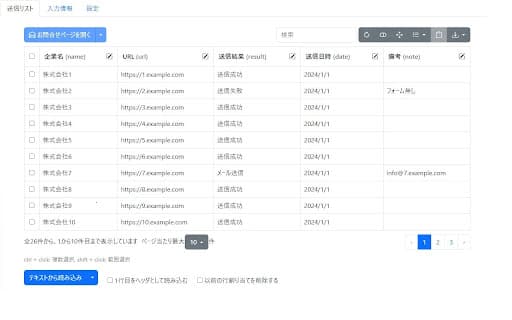
About Inquiry Assist
This platform simplifies sales workflows by automating form filling, managing contact databases, providing input assistance, and enabling personalized message delivery. It boosts outreach efficiency and enhances message relevance.
How to Use
Import your contacts, select the target form, and the tool will automatically populate form fields using your data. Use the input assistance panel for support and customize messages with placeholders for personalization.
Features
- Automatic form completion
- Input assistance for faster operation
- Efficient contact list organization
- Personalized message customization
Use Cases
- Segmenting and managing contact lists for targeted campaigns
- Personalizing messages with company and contact details
- Automating lead collection via online forms
Best For
Marketing teamsBusiness development repsLead generation specialistsSales professionalsOutreach teams
Pros
- Reduces time spent on manual form entry
- Enhances efficiency with input assistance
- Eases contact list organization and filtering
- Supports dynamic message personalization
Cons
- Requires initial setup for form field mapping
- Effectiveness depends on data quality
- Needs accurate contact information for optimal results
FAQs
What form fields can be filled automatically?
The tool can automatically populate fields such as name, phonetic name, company name, email, phone number, fax, postal code, address, department, title, website, subject, and message body.
How do I personalize messages with company-specific details?
Use placeholders like {{company}} to insert company names or other data from your contact list. The tool replaces these with actual values during message sending.
Is it possible to export my contact list?
Yes, you can easily export your contact list from the platform for external use.
Does this tool support multiple form types?
Yes, it can handle various online forms used across different platforms and industries.
Is training or setup required to use this tool?
Some initial configuration is necessary to map form fields, but the process is straightforward with guided instructions.