

Instant Multilingual PDF/HTML/TXT Translator
A versatile browser extension that enables seamless translation of selected text using ChatGPT and Microsoft Translator for enhanced language understanding.
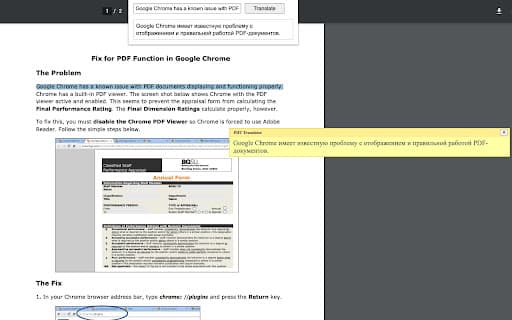
About Instant Multilingual PDF/HTML/TXT Translator
Selection Translator is a powerful browser tool that allows users to translate text directly within any webpage or document. It offers quick access via keyboard shortcuts or context menu, integrating ChatGPT and Microsoft Translator to deliver accurate, context-aware translations across numerous languages, including right-to-left scripts.
How to Use
Highlight the desired text, then press Alt+Shift+A or right-click and select 'Translate selected text'. The translation appears immediately below your selection. You can also modify your selection within the popup by clicking the extension icon.
Features
- Editable popup window for refining translations
- Quick translation through keyboard shortcuts or context menu
- Remove Line Breaks option enhances PDF translation quality
- Add a web search link for detailed information
- Seamless integration with ChatGPT and Microsoft Translator
- Customizable shortcuts and language preferences
- Supports right-to-left language scripts
Use Cases
- Translating foreign language articles and research papers
- Understanding foreign language content while browsing
- Learning new languages by comparing original text with translations
Best For
International business professionalsLanguage learnersWeb researchersStudents studying foreign languagesTravel enthusiasts
Pros
- Highly customizable to suit individual needs
- Fast and convenient translation of selected text
- Integrates with leading translation services (ChatGPT and Microsoft Translator)
- Line Breaks removal improves PDF translation clarity
- Supports a wide array of languages
- Compatible with native PDF formats
Cons
- Performance varies based on text complexity and translation service
- Not compatible with protected or scanned documents
- Requires enabling 'Allow access to file URLs' for local files
FAQs
How can I translate text using this extension?
Select the text, then press Alt+Shift+A or right-click and choose 'Translate selected text' to see the translation.
Can I use this extension to translate local PDF files?
Yes, but you must enable 'Allow access to file URLs' in the extension settings on chrome://extensions.
Why are some PDF translations inaccurate or unclear?
Complex layouts like columns or intricate designs can cause issues. Use the 'Remove Line Breaks' feature for better results.
Is this extension compatible with all websites?
It works well with native PDFs but isn't compatible with protected or scanned documents.
Can I customize translation languages?
Yes, you can set preferred languages and shortcuts in the extension settings for a personalized experience.
Does the extension support right-to-left languages?
Yes, it includes support for right-to-left scripts like Arabic and Hebrew.