

keyNote - web,youtube & pdf AI summarizer
A free Chrome extension that efficiently summarizes web content using eight advanced AI bots, enhancing your learning and productivity.
About keyNote - web,youtube & pdf AI summarizer
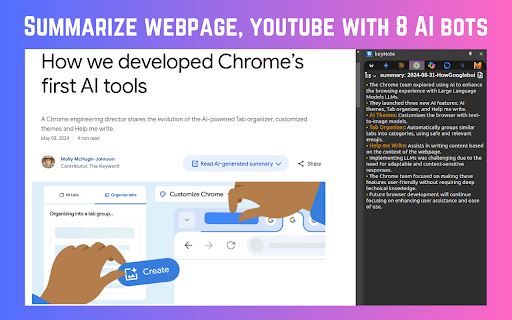
keyNote is a free Chrome extension that quickly summarizes web pages, YouTube videos, and PDFs using eight AI-powered bots. It features mindmap creation, content highlighting, automatic note organization, and seamless export to Notion. Designed to save time, it helps users learn faster and organize information efficiently.
How to Use
Install the keyNote Chrome extension. Click its icon to summarize web pages, videos, or PDFs. Use the shortcut 'Alt+S' to generate a summary of the current webpage or 'Alt+N' to access your notes in Notion.
Features
- Automatically organizes notes by domain, date, or folders
- Summarizes web pages, YouTube videos, and PDFs with eight AI bots
- Exports summaries directly to Notion workspace
- Includes webpage summarization, mindmap creation, and highlighting tools
- Offers editable markdown format for summarized content
- Provides live preview with syntax-highlighted markdown editor
Use Cases
- Efficiently summarize articles and videos for quick understanding
- Export and share summaries within team workspaces in Notion
- Organize research notes by topic, date, or custom folders
Best For
Content creatorsProfessionals seeking quick insightsAcademic researchersStudents preparing for examsKnowledge workersResearchers
Pros
- Summarizes web pages, videos, and PDFs accurately
- Lightweight, free, with no ads or tracking
- Unlimited usage without restrictions
- Includes mindmap and highlighting features
- No account sign-up required
- Seamlessly exports content to Notion
- Automatically organizes notes for easy access
Cons
- Currently in beta version
- Side panel position requires manual adjustment in settings
FAQs
What types of content can keyNote summarize?
keyNote can summarize web pages, YouTube videos, and PDF documents efficiently.
Is keyNote a free tool?
Yes, keyNote is completely free and offers unlimited usage without restrictions.
Do I need to sign up to use keyNote?
No, there is no registration or sign-up required to use keyNote.
How do I generate a webpage summary with keyNote?
Click the 'Alt+S' shortcut or click the extension icon to generate a summary of the current webpage.
Can I export summaries to Notion?
Yes, you can export summarized content directly to your Notion workspace with a single click.