

Kimi Copilot - 网页总结助手
Enhance your browsing experience with this Kimi.ai-powered extension that summarizes web pages and videos efficiently.
About Kimi Copilot - 网页总结助手
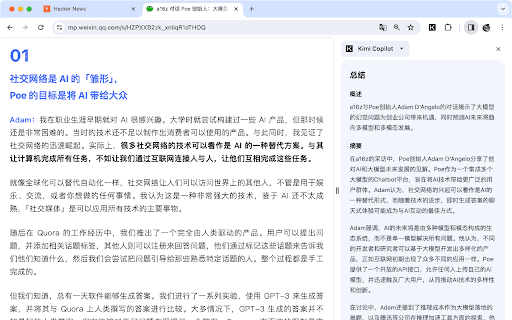
The Kimi AI Summarizer is a browser extension that enables users to quickly generate summaries of web pages and Bilibili videos using Kimi.ai's advanced large language model. Activate it by clicking the icon or pressing Ctrl/Cmd+Shift+K after installation for instant content insights.
How to Use
Install the extension, then click its icon or press Ctrl/Cmd+Shift+K while browsing a webpage or watching a Bilibili video to generate a concise summary of the content.
Features
- Includes a dark mode for comfortable viewing
- Supports summarization of Bilibili videos
- Utilizes Kimi.ai's powerful large language model for detailed summaries
- Allows customization of prompts for tailored summaries
- Enables one-click summarization of websites and videos
- Can summarize content from sites Kimi.ai cannot directly access
Use Cases
- Quickly grasp the main points of lengthy articles
- Summarize Bilibili videos without watching the entire content
- Customize summaries with specific prompts
- Access summaries for websites restricted from Kimi.ai
Best For
ResearchersContent consumers seeking quick insightsStudentsOnline content enthusiastsProfessionals analyzing information
Pros
- Supports customizable prompts for tailored summaries
- Free to use with a Kimi.ai account
- Provides detailed summaries powered by advanced AI
- Can summarize content from inaccessible websites
- User-friendly and easy to operate
- Supports Bilibili video summaries
- Includes a dark mode for comfortable reading
Cons
- Incompatible with Arc browser due to technical restrictions
- Developed by third-party, not an official Kimi.ai product
FAQs
Is this extension an official Kimi.ai product?
No, it is developed by a third-party enthusiast and is not officially affiliated with Kimi.ai or Moonshot AI.
Why doesn't the extension work in Arc browser?
Due to technical limitations, the extension is incompatible with the Arc browser.
Is the extension free to use?
Yes, it is free to use with a Kimi.ai account.
Can I customize the summaries?
Yes, you can personalize summaries by using custom prompts during the process.
Does it support summarizing Bilibili videos?
Absolutely, the extension can generate summaries for Bilibili videos for quick viewing.
How do I activate the extension?
After installation, click the extension icon or press Ctrl/Cmd+Shift+K to generate a summary.