

Koko - Text improver
An AI-powered Chrome extension designed for real-time writing enhancement and editing support.
About Koko - Text improver
Koko's Text Improver is a Chrome extension that leverages artificial intelligence to enhance your writing instantly. It assists users in creating clearer emails, blog posts, school assignments, and other written content with improved accuracy and clarity.
How to Use
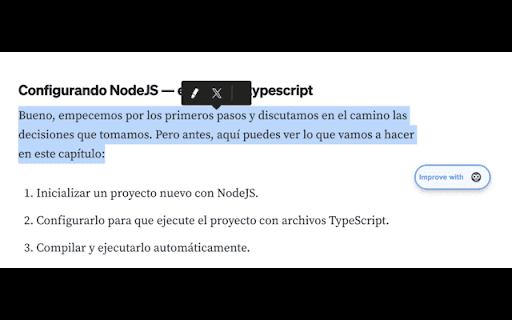
Highlight the desired text on any webpage, click the 'Improve with Koko' button, then copy or translate the improved content as needed.
Features
- Supports translation into multiple languages
- Provides instant AI-powered text enhancement
Use Cases
- Refining emails, blog articles, and academic papers
Best For
StudentsContent creatorsProfessionalsWritersResearchers
Pros
- Works seamlessly across various websites
- Includes integrated translation capabilities
- Enhances writing confidence
- Delivers quick, automated editing suggestions
Cons
- Performance depends on AI model quality
- Full features require API key registration
FAQs
How does the Text Improver with Koko function?
Select the text you'd like to improve, click the 'Improve with Koko' button, and the AI will analyze and enhance your content. You can then copy or translate the improved text.
Is an API key necessary to use Koko's Text Improver?
Yes, obtaining an API key is required for full access. Visit the official website to learn how to get your API key.
Can I use Koko on different websites?
Yes, Koko works on any website, including Gmail, Google Docs, Twitter, LinkedIn, and more.
Does Koko support multiple languages?
Yes, the extension includes built-in translation features supporting numerous languages.
Is the extension suitable for students and professionals?
Absolutely. Koko is ideal for students, content creators, and professionals seeking quick, reliable writing improvements.