

LightPDF: AI Chat & Summary for PDF/Web
AI-powered PDF software for efficient summarization, editing, conversion, and management of PDF documents.
About LightPDF: AI Chat & Summary for PDF/Web
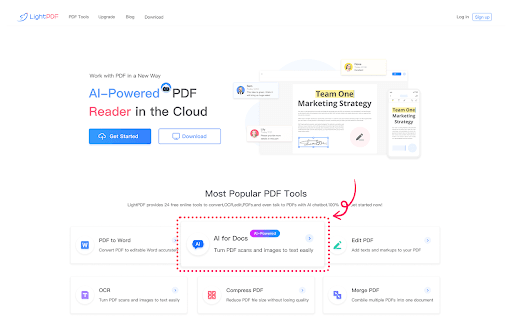
LightPDF is a comprehensive, AI-driven PDF solution designed for work and study. It enables users to summarize, analyze, and interact with PDFs and other documents effortlessly. The platform extracts text from scanned images, converts files into editable formats, and offers tools for editing, annotating, and securely storing PDFs in the cloud.
How to Use
Download LightPDF to easily convert, edit, view, and store PDFs. Use the chat feature to interact with your documents, utilize OCR to extract text from scans, and edit PDFs with annotations. Share files via links to facilitate teamwork and collaboration.
Features
- Convert PDFs and perform OCR on scanned documents
- Seamless team collaboration with file sharing and editing
- Cloud-based PDF editor and viewer for accessibility anywhere
- Interact with PDFs, scans, and Office documents through chat
Use Cases
- Adding watermarks and permissions to safeguard sensitive PDFs
- Summarizing long reports for quick insights
- Converting scanned images into editable Word documents
- Collaborative editing of contracts with team members
Best For
Legal professionalsProject managersResearchersEducatorsStudentsOffice workers
Pros
- Advanced OCR for extracting text from scanned images
- Collaborative features for team editing and sharing
- Secure cloud storage accessible from any device
- AI-driven tools for summarization and document interaction
- All-in-one PDF suite with versatile functionalities
Cons
- Possible restrictions on file size or number of free conversions
- Dependence on internet connection for cloud features
- Premium subscription may be required for advanced features
FAQs
What types of documents can I chat with using LightPDF?
You can interact with PDFs, scans, web pages, Excel, Word, PowerPoint, and ePub files.
Which file formats can LightPDF convert PDFs into?
LightPDF can convert PDFs to Word, JPG, PNG, Excel, PowerPoint, and plain text formats.
Is LightPDF available on multiple devices?
Yes, LightPDF syncs your files across devices, allowing seamless access anywhere.
How do I share files with my team using LightPDF?
Share files via secure links and invite team members to view, edit, comment, highlight, or sign PDFs collaboratively.
Does LightPDF support OCR for scanned documents?
Yes, it includes OCR technology to extract editable text from scanned images.