

Lingocloud - Web Translation Extension
A web translation tool designed for seamless browsing in your native language, removing language barriers online.
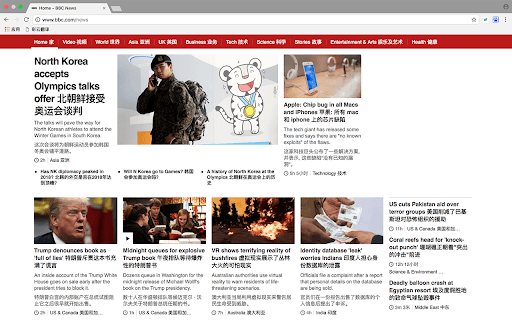
About Lingocloud - Web Translation Extension
LingoCloud is a powerful browser extension that helps users navigate foreign websites effortlessly by translating content into their native language. It supports real-time website translation, word lookup, and subtitle translation for videos, enhancing your browsing experience and language skills simultaneously.
How to Use
1. Click the LingoCloud Extension icon on an English webpage to activate parallel text mode. 2. Tap on translated text to edit or review, earning Cloud Points. 3. Highlight text on English or Japanese pages for immediate word translation. 4. Enable video translation to get real-time subtitles for English videos. 5. Access settings to customize text, page, and video subtitle translations within the options menu.
Features
- Parallel Chinese-English text mode for easy comparison
- Instant word translation on English and Japanese websites
- Real-time subtitle translation for videos
- Automatic website translation into your native language
- Editable translations with rewards for contributions
Use Cases
- Quickly understand unfamiliar words on English or Japanese sites
- Watch videos with live translated subtitles for better comprehension
- Enhance language skills through reading and editing translated content
- Browse foreign websites effortlessly in your native language
Best For
Pros
- Contribute to translation quality and earn rewards
- Break down language barriers for smooth browsing
- Support language learning through translated content
- Get quick word translations for instant understanding
- Enjoy real-time video subtitle translation
Cons
- Translation accuracy may vary depending on content
- Machine translations might sometimes be imprecise
- Cloud Points system requires active participation for continued access