

Linkedin Message Assistant
A Chrome extension designed for composing LinkedIn messages using a local Large Language Model (LLM).
About Linkedin Message Assistant
This Chrome extension enables you to craft professional LinkedIn messages using a local Large Language Model (LLM). It empowers users to generate engaging and personalized messages directly within LinkedIn, without relying on external servers or risking data exposure. By leveraging a local LLM, you retain full control over your data and privacy while enhancing your outreach efficiency.
How to Use
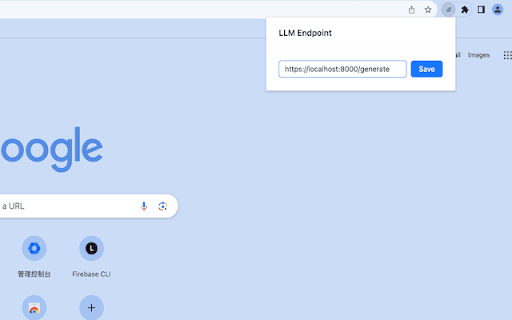
Install the extension, input your local LLM URL (such as TGI or Llamacpp endpoint), open LinkedIn messages, specify your message goal, and click generate to receive suggested content.
Features
- Generate LinkedIn messages using a local Large Language Model
- Seamless integration with LinkedIn's messaging interface
- Enhanced privacy through local data processing
Use Cases
- Personalized connection request messages
- Follow-up messages after interviews
- Outreach messages for networking opportunities
- Thank-you notes for referrals
Best For
Marketing professionalsRecruitersBusiness development managersSales professionalsNetworking enthusiastsJob seekers
Pros
- No dependence on external message generation services
- Ensures data privacy with local processing
- Integrates directly with LinkedIn messaging
- Customizable message options tailored to your goals
Cons
- Backend API supports only HuggingFace text generation inference
- Performance varies based on your local machine's capabilities
- Requires setup of a local LLM (such as TGI or Llamacpp)
- Currently supports only the dolphin-2.2-yi-34b prompt format
FAQs
Which LLM formats are compatible?
Only the dolphin-2.2-yi-34b prompt format is currently supported.
What backend API does this extension use?
It supports only HuggingFace's text generation inference API.
What do I need to start using this extension?
You need a local LLM setup, such as TGI or Llamacpp, and a compatible model.
Can I customize the generated messages?
Yes, you can set specific objectives to tailor the message output.
Is this extension secure for sensitive data?
Absolutely, since all processing occurs locally without sharing data externally.